Meet Enhanced Source Code Editing in CKEditor (Advanced HTML Control)
Initially introduced to bring feature parity with CKEditor 4, CKEditor 5’s Source Code Editing feature has evolved far beyond its roots. The new Enhanced Source Editing is a premium, fully equipped solution that transforms the basic view-and-edit mode into a modern, developer-friendly experience.
While the basic Source Code Editing plugin covers simple code edits, Enhanced Source Editing delivers a full-featured, integrated coding workspace. Before diving into the enhanced version, let’s revisit what the Source Code Editing capability actually does.
What is Source Code Editing?
The Source Code Editing plugin allows users to view and make more tailored, advanced modifications of the underlying source of their content. The source code is typically HTML, though you can also use Markdown or other formats if configured that way.
While WYSIWYG editors are designed so users don’t need coding experience, source editing assumes a certain technical proficiency and is ideal for users who want to:
-
Add or modify HTML elements that aren’t natively supported by other plugins.
-
Insert custom attributes, inline styles, or classes.
-
Fine-tune layout, structure, or embedded elements beyond what’s possible in WYSIWYG mode.
The feature is valuable for both developers integrating CKEditor and for advanced end users who need precise control over structure and styling.
How does Source Code Editing work in CKEditor?
Source Code Editing works as a standalone plugin, but adding supporting plugins improves how CKEditor interprets and preserves advanced HTML. Because CKEditor filters unsupported or unknown HTML by design, some manual edits may not render correctly or may be stripped during processing. To make this work smoothly, several supporting features can be combined with Source Code Editing or Enhanced Source Code Editing:
-
General HTML Support (GHS): Enables additional HTML elements, attributes, classes, and styles while ensuring they remain valid in both editing and output.
-
HTML Comment Element: Keeps HTML comments intact within the document source.
-
HTML Embed: Allows embedding arbitrary HTML snippets (e.g., widgets, analytics, or forms).
-
Full Page HTML: Expands editing to entire HTML pages: from
<html>to</html>, including metadata and<head>content.
Together, these plugins make source code editing in CKEditor more flexible, while ensuring the editor’s output remains predictable and valid.
What is Enhanced Source Code Editing?
While the base Source Editing plugin provides control, the Enhanced Source Editing feature takes it several steps further, transforming the experience into a modern, fully equipped code-editing environment.
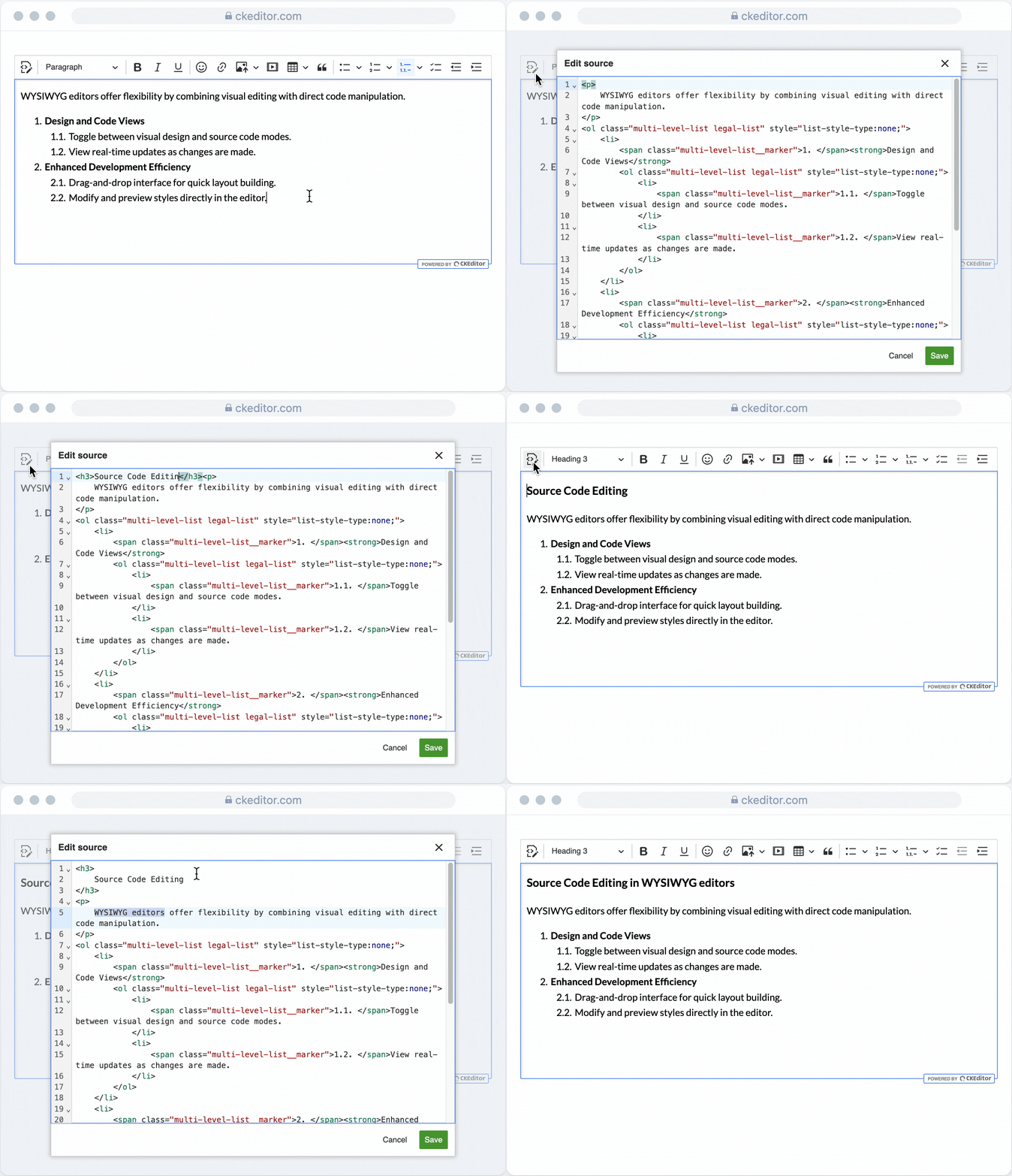
Enhanced Source Code Editing offers everything the basic plugin does, but adds the kind of tooling developers expect from contemporary IDEs. This includes:
-
Syntax highlighting
-
Autocomplete for HTML tags and attributes
-
Code folding
-
Bracket and tag matching
-
Keyboard shortcuts
-
Undo/Redo support
-
Light and dark themes, plus custom themes when self-hosting
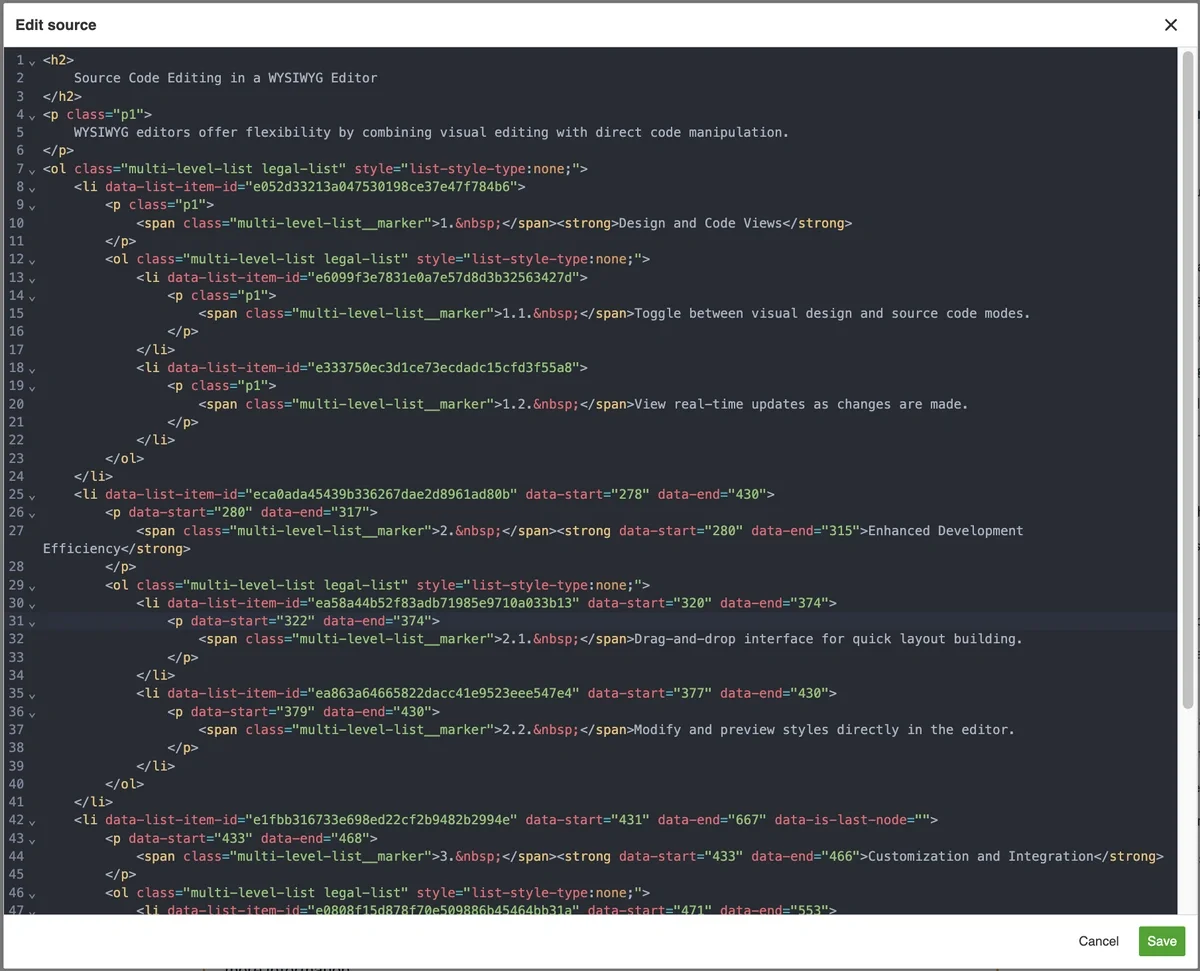
Enhanced Source Code Editing is available in the Essential, Professional, and Custom plans.
These tools make it easier to navigate large blocks of code inside the editor, reduce the risk of structure-breaking mistakes, and improve the speed and accuracy of editing raw markup. Whether users need to adjust complex structures, insert custom elements, or manage advanced styling, Enhanced Source Code Editing enables them to work with precision, clarity, and efficiency.
Enhanced Source Code Editing is also available in the Drupal Premium Features module.
Source Code Editing vs Enhanced Source Code Editing
When CKEditor 5 was first released, the idea was clear: users should never need to edit HTML directly. The editor was designed to show the final published form of content, not the underlying code. CKEditor 5 introduced an entirely new architecture with advanced features like real-time collaboration, comments, and track changes. Allowing users to modify raw HTML could easily disrupt these mechanisms, especially for non-technical users unfamiliar with markup.
Both Source Code Editing and Enhanced Source Code Editing are incompatible with collaboration features and include limitations for several other functionalities. You can learn more about the limitations in the documentation.
However, users still wanted direct access to the source code, especially those coming from CKEditor 4 who were accustomed to relying on source editing to add HTML elements and attributes not otherwise supported. Even though CKEditor 5 intentionally avoided this capability due to the risks it posed for collaboration, structured editing, and content integrity, ongoing feedback made it clear that advanced users still needed a controlled way to edit markup directly.
This led to the introduction of the Source Code Editing feature, a careful balance between WYSIWYG safety and developer control. Over time, and with continued community input, that foundation evolved into something more powerful: Enhanced Source Code Editing.
Comparison: Source Code Editing vs. Enhanced Source Code Editing
Feature/Capability | Source Code Editing | Enhanced Source Code Editing |
Basic view/edit of source code | ✅ | ✅ |
Works across all editor types | ❌ | ✅ |
Syntax highlighting | ❌ | ✅ |
Autocomplete(tags, attributes) | ❌ | ✅ |
Code folding | ❌ | ✅ |
Bracket/tag matching | ❌ | ✅ |
Keyboard shortcuts | ❌ Basic browser shortcuts | ✅ CKEditor shortcuts |
Light/Dark themes | ❌ | ✅ |
Custom themes | ❌ | ✅ when self-hosting |
Best for | Simple edits, minor tweaks | Complex structures, templates |
Suitable for non-technical users | No – requires markup knowledge | No – but safer and easier for technical and non-technical users alike |
Requires integrating supporting plugins | ✅ | ✅ |
Free feature | ✅ | ❌ |
When and why should you use Enhanced Source Code Editing?
Enhanced Source Code Editing is most useful in environments and situations where teams need precise control over structure, styling, or custom HTML. These include:
-
Marketing emails: Adjust table-based layouts, inline styles, or responsive elements directly in the editor.
-
CMS and blog customization: Insert branded HTML snippets, widgets, or dynamic components without leaving the platform.
-
Technical documentation: Handle large content blocks, code snippets, or complex structures more efficiently.
-
Legal and compliance documents: Apply precise metadata, formatting, and accessibility attributes to meet organizational or regulatory standards.
While supporting these advanced workflows, Enhanced Source Code Editing addresses different needs depending on who is using it.
For developers:
-
Less support overhead as users can independently fix or customize markup
-
Consistent across editor types, including Classic, Inline, Balloon, Document, and Multi-root
-
Scalable integration for enterprise platforms and multi-editor deployments
For end users:
-
Improved clarity thanks to syntax highlighting and code folding, making complex markup easier to navigate
-
Productivity boost from autocomplete, shortcuts, and guided editing
-
Greater autonomy to adjust layouts or embeds without relying on external tools
Enhanced Source Code Editing also supports broader team and organizational needs. By keeping everyone in the same editing environment, it reduces fragmentation and removes the need for external HTML editors or one-off tools.
This unified approach also strengthens content governance. With everyone working inside the same interface and editing logic, it becomes easier to maintain quality, enforce internal standards, and ensure consistent output at scale. Whether you’re managing a large documentation portal, a multi-product platform, or regulated content, Enhanced Source Code Editing helps organizations stay aligned, efficient, and fully in control of their content’s structure and integrity.
By combining a familiar WYSIWYG experience with a dedicated, developer-friendly code editor, Enhanced Source Code Editing offers flexibility without sacrificing consistency. It gives teams a controlled, unified way to handle complex markup and specialized content needs, all within CKEditor.
You can explore Enhanced Source Code Editing in our live demo or start a 14-day free trial to test it directly in your environment.