Is your vibe-coded rich text editor enterprise-ready? A 17-point checklist
22min read
|What engineering leaders should check
- A vibe-coded or forked rich text editor rarely stays enterprise-ready past its first years in production. There’s often no clear owner for the engine or the work needed to keep it running, so every browser change, upgrade, and security review becomes your team's job.
- Use these 17 questions to assess the editor you’ve built or bought. They cover four pressures that come with enterprise growth: years in production, more teams and plugins, security and vendor-risk review, and regulated releases and audits.
- For each answer, ask for something you can check: a versioning policy, a dated support window, a migration guide, a dependency list, a security policy, and a support contract.
- An editor needs four things to keep working as your business grows: long-term support, backwards compatibility, stable upgrade paths, and a controlled dependency footprint. In practice, that means a version line you can stay on for years, with security and compatibility fixes, no breaking changes, and an overlap with the next line.
- Security review needs a documented split between what the editor filters and what your backend must still sanitize.
- If you fail questions in checklists 1 and 2, you may need to find a replacement. Partial answers usually point to “refactoring.”
- The checklist covers rich text editors embedded in customer-facing products and internal applications, from GRC and risk platforms to banking, insurance, and life sciences software. It doesn't cover standalone word processors.
A team forks an open-source editor to ship faster, and three years later it can’t take a single upstream update. A vibe-coded editor reaches that point sooner, because it never had an upstream. You find out how much maintenance you’ve taken on when the next framework upgrade, security review, or audit comes around. These 17 questions show whether your editor, built or bought, will survive all three.
Why a vibe-coded editor becomes technical debt you own
An enterprise-ready rich text editor needs to keep working for years inside a product your business depends on. It has a published release and support policy, documented upgrade paths, a controlled dependency tree, security processes a reviewer can inspect, and a support line under contract, and it behaves predictably from a two-line comment to a long regulatory report.
Vibe coding technical debt is the maintenance cost that builds up when AI-generated code ships without a design rationale, tests, or an owner who understands it. With an editor, much of the maintenance comes down to who understands the code well enough to fix it. Every browser change, pasted document, dependency update, and framework upgrade becomes your team’s job, in code nobody on the team designed.
A December 2025 study of vibe coding in practice describes how this happens. It describes a “flow-debt trade-off”: code gets generated quickly, while design problems, security vulnerabilities, and maintenance work build up. The authors trace it partly to a missing design rationale, which is exactly what you need when a bug report lands in an editor nobody wrote by hand.
A fork of an open source editor has the same problem from a different starting point. Each local patch to the engine widens the gap with upstream, so every release you skip makes the next one harder to take. If you want the case for why editors are a different class of system, start with our breakdown of the risks of vibe coding a rich text editor. These problems often surface when a vibe-coded prototype goes into production. This checklist picks up where those end: what to verify once the editor is already in production.
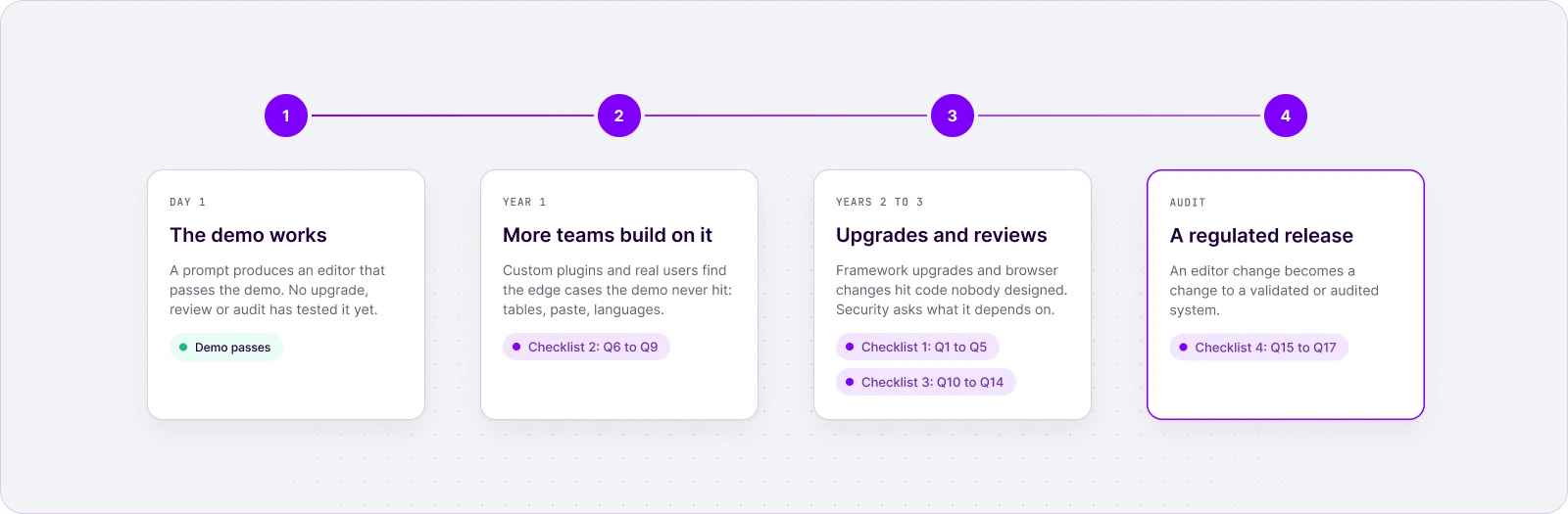
Most editors get harder to maintain the longer they stay in production: frameworks evolve, dependencies change, requirements expand, and every upgrade carries risk. The maintenance work grows as the editor gets older and more people depend on it. Watch for these four pressures:
- Years in production. Frameworks, browsers, and dependencies move; the editor has to move with them.
- More teams and custom plugins. Each team adds features, edits the same documents, and finds edge cases the initial demo never hit.
- Security and vendor-risk review. Someone asks what the editor depends on, what HTML it lets through, where it calls out to, and who supports it.
- Regulated releases and audits. A change to the editor becomes a change to a validated or audited system.
How to score your editor against this checklist
Use the checklist before procurement, to assess an editor you already run, or as a shared document between engineering, security, and vendor risk. Answer each question in writing, with a source: a policy page, a changelog, a contract clause, or a named owner. An answer that only exists in someone’s head scores as a fail, because it leaves when that person does.
Use three grades:
- Pass: documented, current, and owned.
- Partial: true today, but not written down or not owned by anyone in particular.
- Fail: no answer.
Split the work by role. The engineering manager owns checklists 1 and 2, the architect co-owns 2 and 3, and the procurement or vendor-risk reviewer owns 3 and 4. Senior front-end engineers run the hands-on tests (questions 4 and 6 to 11), and the product manager owns the cost and roadmap decision at the end. The questions apply equally to an in-house build, a fork, an open-source framework, and a commercial editor; only the evidence changes. If your team is still defining what enterprise requirements mean for an editor, our guide to rich text editors for enterprises covers the basics.
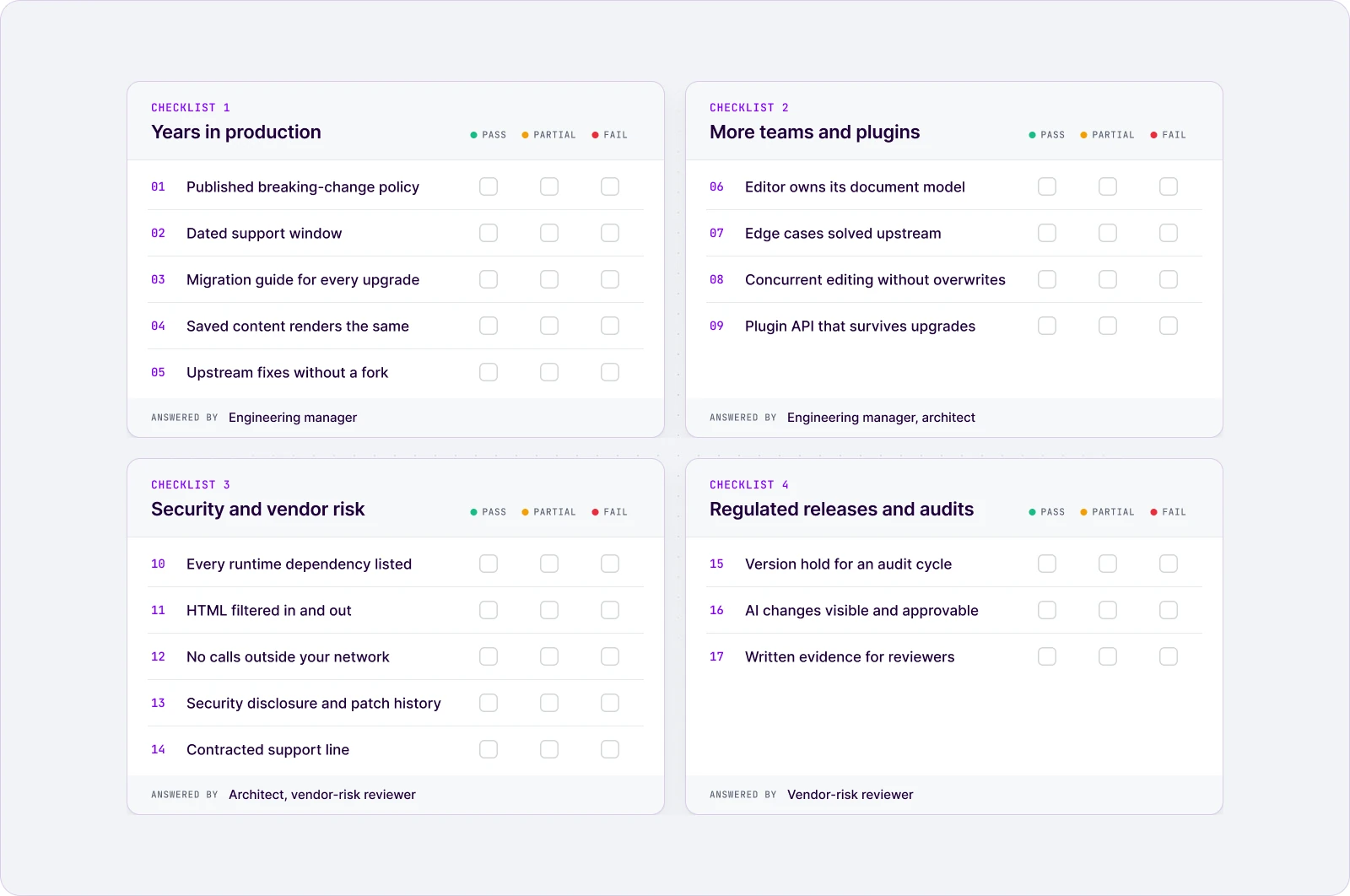
The checklist
Each question is explained in the sections that follow, with an example of a passing answer.
| # | Question | A passing answer | Answered by |
|---|---|---|---|
| Years in production | |||
| 1 | Is there a published versioning and breaking-change policy? | Layers defined, with what counts as major or minor | Engineering manager |
| 2 | Is there a support window you can plan releases around? | A dated window with phases and a migration overlap | Engineering manager |
| 3 | Does every upgrade ship with a migration guide? | Breaking changes listed per release, with code | Engineering manager |
| 4 | Will documents saved today load the same after upgrades? | Data-output changes documented; content exports to standard formats | Engineering manager, architect |
| 5 | Can you take upstream fixes without merging a fork? | Customizations live in plugins and configuration | Engineering manager |
| More teams and plugins | |||
| 6 | Does the editor own its document model? | A model, a view, and a conversion layer you extend | Architect |
| 7 | Are common edge cases solved upstream, or left to your team? | Tables, pasting, and lists are maintained | Engineering manager, architect |
| 8 | Can several people edit and review without overwriting each other? | Comments, track changes, revision history, real-time or asynchronous | Architect |
| 9 | Will your plugins survive the next upgrade? | A plugin API with stated stability rules | Architect |
| Security and vendor risk | |||
| 10 | Can you list every runtime dependency and who maintains it? | A short, pinned, single-owner dependency tree | Architect, vendor-risk reviewer |
| 11 | How does the editor filter HTML coming in and going out? | A documented split between editor filtering and backend sanitization | Architect, vendor-risk reviewer |
| 12 | Can the editor run without calling anything outside your network? | Self-hosted, strict CSP, no licensing call home | Vendor-risk reviewer |
| 13 | Is there a security disclosure process and a patch history? | A published channel and patches on every supported line | Vendor-risk reviewer |
| 14 | Who supports when production breaks? | Contracted support with a service level agreement | Vendor-risk reviewer |
| Regulated releases and audits | |||
| 15 | Can you hold one version for a validation or audit cycle? | A patch-only line with a dated window | Vendor-risk reviewer |
| 16 | Can reviewers see and approve what AI changed? | AI edits arrive as marked suggestions a person decides on | Vendor-risk reviewer, engineering manager |
| 17 | Can you hand the reviewer written evidence? | A document pack you can file | Vendor-risk reviewer |
Checklist 1: can the editor stay current for years without a rewrite?
An editor survives year three when four properties exist in writing, each backed by a document you can ask for:
| Property | Written evidence to ask for | Checked in |
|---|---|---|
| Long-term support | A dated support window you can hold a version on | Q2 support window; Q15 version hold (checklist 4) |
| Backwards compatibility | A breaking-change policy and a record of every possible change to the content it saves | Q1 versioning policy; Q4 saved documents |
| Stable upgrade paths | A migration guide for every upgrade, with customizations kept outside the engine | Q3 migration guides; Q5 forks |
| Controlled dependency footprint | A short, pinned dependency list with named owners | Q10 dependency list (checklist 3) |
CKEditor is built around that long lifecycle, and it publishes evidence around all of the requirements above. Its long-term support edition gives up to 3 years of guaranteed updates with zero breaking changes, its versioning policy defines which changes count as breaking, and each release ships an update guide. A vibe-coded editor has none of these, and a fork loses them the day it diverges.
1. Is there a published versioning and breaking-change policy?
A breaking-change policy tells you which upgrades are safe before you run them. Without one, every upgrade is a guess, and teams respond by not upgrading at all. The policy is how a vendor turns backwards compatibility from a hope into a commitment.
A passing answer defines layers and says what counts as major or minor in each. CKEditor’s versioning policy is a useful benchmark:
| Layer | Covers | A breaking change here is | How often |
|---|---|---|---|
| Integration layer | Builds, configuration, top-level APIs | Major | Rare: "introduced very rarely and only when unavoidable" |
| Plugin development API | The API custom plugins are built on | Major | Batched to reduce the number of major releases |
| Lower-level customization APIs | Deeper customization points | Minor | In minor releases, because these APIs are treated as less stable |
All packages share one version number and pin their dependencies, so a build is reproducible.
2. Is there a support window you can plan releases around?
A support window is a dated commitment to fix security and compatibility issues on a version you can stay on. It matters because enterprise release plans run in quarters and years, while browsers ship every few weeks.
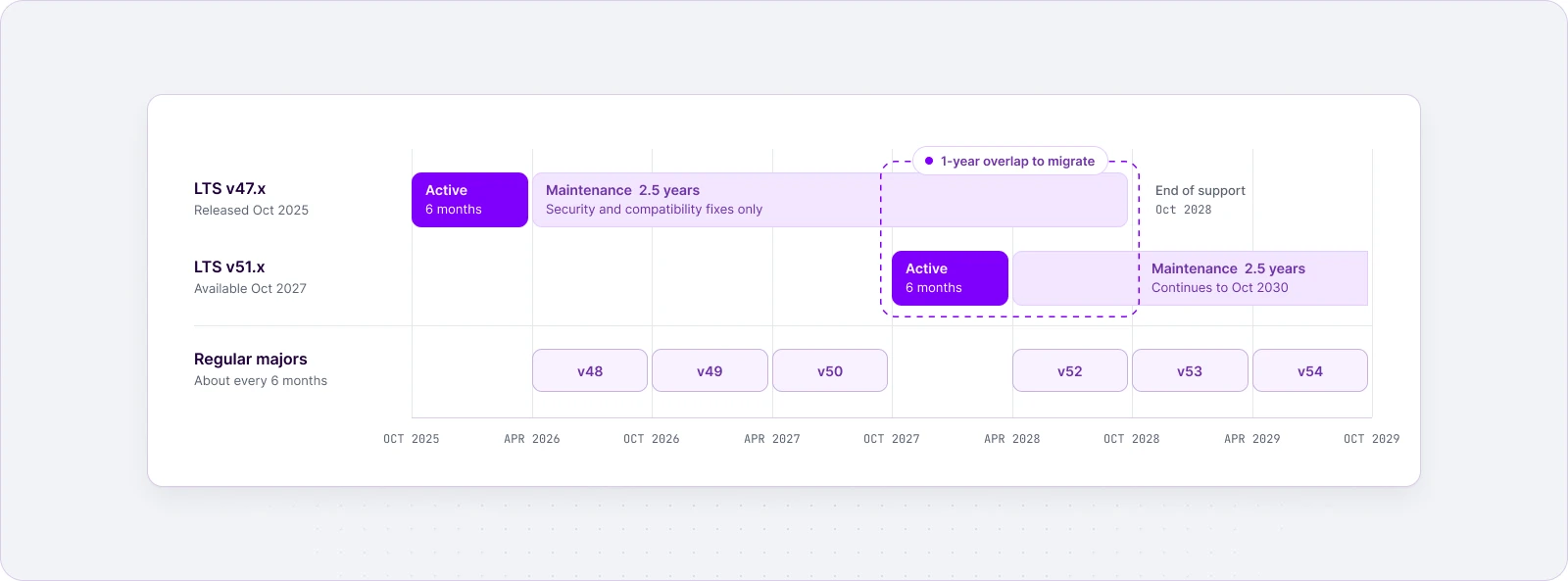
A passing answer names the window, its phases, and how you move to the next one. CKEditor typically publishes a new regular major every 6 months. For teams that can’t absorb that pace, one major every two years becomes an LTS line:
- 6 months of active development: new features and bug fixes, with no breaking changes outside a closed, pre-announced list of exceptions.
- 2.5 years of maintenance: security fixes plus critical and high-severity third-party compatibility updates, for example with browsers or Microsoft Word and Excel.
- A 1-year overlap with the next LTS line, so migration is planned rather than forced.
The first LTS line shows how this plays out: it started in October 2025 and is supported until October 2028, and the next line starts in October 2027, a year before the first one ends. The LTS Edition is a commercial option, and the details are in our post introducing the CKEditor 5 LTS Edition. A vibe-coded editor has no support window at all: every browser or framework change becomes a fix your team writes on the day it breaks.
3. Does every upgrade ship with a migration guide?
A migration guide turns an upgrade from an investigation into a task list. Without one, your engineers reverse-engineer each release from a diff.
A passing answer is a guide per release that lists breaking changes and shows the code you need to change. CKEditor’s update guides are typical: each minor release has its own “Minor breaking changes in this release” section, and every guide for a major release walks through the specific breaking changes that need to be take into consideration when upgrading.
4. Will documents saved today load the same after upgrades?
Documents load the same after an upgrade only if the editor treats its data output as a contract and documents every change to it: backwards compatibility for your content, not just for your code. Your content outlives any editor version, so a silent change to stored HTML becomes format drift: documents saved years ago that render differently, fail validation, or break the systems downstream.
A passing answer documents data-output changes release by release and lets content leave in standard formats. CKEditor’s update guides flag these changes explicitly: one release made the mention feature store a data-mention-uid attribute so the same HTML always produces the same internal data model, and another published the new media embed markup with before-and-after HTML. For portability, CKEditor can import from Word and export to Word and export to PDF. A vibe-coded editor changes its output whenever someone regenerates the code, and nobody writes the change down.
5. Can you take upstream fixes without merging a fork?
You can take upstream fixes cleanly only when your customizations live outside the engine. Every line you change inside someone else’s engine code becomes a merge conflict on their next release.
That is the fork story from the introduction, and teams describe it the same way: they forked an open-source editor, and now they can’t take its updates. A passing answer keeps your features in plugins and configuration on top of a maintained core, so an upgrade changes the core and leaves your code alone. A vibe-coded editor fails this by default: there is no upstream, so every fix is yours to write.
Checklist 2: will the editor hold up when more teams build on it?
As more teams build on the editor, you get more custom plugins, more people in the same documents, and more edge cases found by real users. An editor holds up only if it:
- owns its document model (question 6),
- solves common edge cases upstream (question 7),
- handles concurrent editing and review (question 8),
- keeps its plugin API stable across upgrades (question 9).
6. Does the editor own its document model?
An editor that owns its document model represents content as data it controls, then renders it to the browser. One that doesn’t, relies on the browser’s built-in editing behavior and patches it wherever it breaks, which means every team patches it differently.
A passing answer is a model, a view, and a conversion layer you extend through plugins. In CKEditor, the editing engine is “the largest and most complex part” of the editor, built around a model, a view, and the conversion between them. This is the design choice behind CKEditor: teams extend a custom data model through plugins instead of patching browser editing behavior, so a table fix or a new block type lands in one place and survives the next upgrade. We explained why contentEditable is not an editor when we first moved away from relying on it.
7. Are common edge cases solved upstream, or left to your team?
Common edge cases are solved upstream when the editor’s owner ships and maintains them, so your team configures them instead of building them. Tables are the classic test. One team told us their in-house editor couldn’t add or remove table rows, select several cells, or merge them. Each of those is a feature someone now has to build, test across browsers, and keep working, and until they do, users draft in Word and paste the result in.
A passing answer is behavior that already exists and is documented. CKEditor’s table feature adds and removes rows and columns and merges or splits cells from a contextual toolbar, and its table selection lets users select any rectangular block of cells and format them all at once. Behavior like this is what accumulates over years of production use, and CKEditor has been on the market for more than 20 years.
Insert a row, select several cells and merge them from the table contextual toolbar.
Tables are one example. Languages support, input methods, and writing direction multiply the list, which is why we keep a separate global editing readiness checklist for teams shipping to global users.
8. Can several people edit and review without overwriting each other?
Several people can share a document safely when the editor records who changed what and merges concurrent edits, instead of keeping whichever save came last. Once legal, compliance, and product teams share a document, last-write-wins means lost work and a broken audit trail.
A passing answer covers both ways teams work: real-time co-editing, and asynchronous review with comments, suggested changes, and a revision history. CKEditor ships these as drop-in collaboration features: comments, track changes, and revision history, usable on their own or together, in real time or asynchronously. Building the same layer yourself means designing conflict resolution, presence, and a change model before the first comment box works. For how the pieces fit together, see our breakdown of collaboration features in rich text editors.
9. Will your plugins survive the next upgrade?
Plugins survive upgrades when the API they are built on has stated stability rules. Otherwise each upgrade risks breaking every team’s custom features at once.
A passing answer tells you how often the plugin API can break and how changes are announced. CKEditor’s versioning policy treats breaking changes to the plugin development API as major and batches them, and unified versioning means every package moves together, so you never debug a mismatch between half-upgraded parts. A vibe-coded editor has no plugin API to keep stable: every team edits the same generated code, so one team’s fix can break another team’s feature.
Checklist 3: will the editor pass a security and vendor-risk review?
As the editor reaches more customers and more data, it lands in front of a vendor-risk reviewer, who asks the same five things of any component:
- What does it depend on? (question 10)
- What untrusted HTML does it let through? (question 11)
- Where does it call out to? (question 12)
- How are vulnerabilities reported and patched? (question 13)
- Who answers when it breaks? (question 14)
A vibe-coded editor’s answer to the last one is “whoever wrote the prompt.” For the wider set of controls reviewers check, see our guide on compliant apps and your rich text editor.
10. Can you list every runtime dependency and who maintains it?
Every runtime dependency is code you ship, a supply-chain risk you inherit, and a source of breaking changes you absorb on someone else’s schedule. A controlled dependency footprint keeps those risks small for as long as the editor stays in production. A reviewer needs the list, the owners, and how versions are controlled.
A passing answer is a controlled dependency footprint: a short, pinned dependency tree with clear ownership. As of October 2026, the ckeditor5 package has 59 runtime dependencies, and every one of them is a @ckeditor/* package, versioned and pinned together. A vibe-coded editor’s dependency list is whatever the model imported, and nobody chose those packages on purpose.
11. How does the editor filter HTML coming in and going out?
Untrusted HTML is the main attack surface of any rich text editor: users paste from websites and documents, and integrations write content through APIs. A reviewer needs to know what the editor filters, what it doesn’t, and what your backend must still do.
A passing answer documents that split instead of promising complete XSS protection. In CKEditor it looks like this:
| Editor side (CKEditor) | Your side |
|---|---|
| Converts content into its own model and filters out markup that no registered feature or schema rule accepts | Sanitizes all content on the backend |
| Blocks scripts by default under General HTML Support | Sets strict Content Security Policy rules |
| Can allow extra HTML, but allowing all HTML is a security risk | Decides which extra HTML to allow |
The General HTML Support guide is explicit that the editor “does not feature a full XSS filter,” which is why your side of the split is not optional. A vibe-coded editor filters whatever the model that generated it happened to think of, and nobody can show the reviewer where the boundary is.
12. Can the editor run without calling anything outside your network?
An editor can run inside a closed network only if its code, assets, and license checks are all served from inside it. In regulated and critical environments that is often a hard requirement. One team put it simply: the editor can’t call anything outside their network.
A passing answer covers three things:
- Self-hosted distribution: the editor installs from npm or a ZIP and runs from your servers.
- A documented strict CSP: CKEditor’s Content Security Policy guide shows a self-hosted editor running with
script-src 'self'andconnect-src 'self'. A CDN-served editor needs the CDN and the license check host added. - Licensing that doesn’t phone home: cloud plans send a license check when the editor loads, so ask for a self-hosted plan without usage metering if outbound calls are not allowed.
Some features call external services by design, so ask for the list before the review: CKEditor’s security page notes that a detailed list of features that access external services is available from your account manager. CKEditor supports cloud, on-premises, and hybrid setups, and the trade-offs between them are covered in our comparison of cloud or on-prem implementation.
13. Is there a security disclosure process and a patch history?
A disclosure process tells researchers where to report a vulnerability, and a patch history shows how fast fixes actually ship. Reviewers want both, on every version you might run.
A passing answer is a published channel and visible security releases on each supported line. For CKEditor:
- Disclosure channel: the security policy routes reports to a dedicated security team and asks reporters not to disclose before a fix is released.
- Release cadence: the release history shows 25 releases in the 12 months to October 2026.
- Parallel patching: the LTS and regular lines are patched together. In September 2026, both lines got patch releases on the same day twice within a week, on 16 and 22 September. We covered the first round in our post on security fixes for both release lines.
- Attestation: a SOC 2 Type II report, listed in its public trust center.
A vibe-coded editor has neither a disclosure channel nor a patch history, so its vulnerabilities surface when someone else finds them.
14. Who supports when production breaks?
When production breaks, the answer should come from a support line written into a contract.
A passing answer names the channel, the volume, and the service level. CKEditor’s pricing page lists professional support at 2 requests per month on the Essential plan and 4 on Professional, with requests “answered according to a service level agreement.” The Custom plan adds enterprise support with a dedicated Slack channel and unlimited requests. Licensed customers get direct support from the core CKEditor development team, the people who maintain the engine.
Checklist 4: can the editor survive a regulated release or an audit?
As the product moves into regulated work, the editor ends up inside systems that auditors and validation processes care about: GRC and risk platforms, banking, insurance, FinTech and InsurTech software, and life sciences tools. A policy editor in a GRC platform, a claims-correspondence editor at an insurer, or a documentation tool in life sciences can’t change behavior between releases without someone noticing. An editor change can mean re-testing a validated system or explaining a change to an auditor, so the editor must let you:
- hold a version still (question 15),
- show who changed the content, including AI (question 16),
- hand the reviewer evidence (question 17).
15. Can you hold one version for a validation or audit cycle?
Holding a version still is safe while security fixes keep arriving on it without breaking changes. Without that, you choose between an unpatched editor and an unplanned revalidation.
A passing answer is a patch-only line with a dated window. CKEditor 5 LTS is built for this case: one major line gets security and compatibility fixes only, so a validated configuration stays validated between planned upgrades. The LTS guide puts it plainly: “No forced upgrades for 3 years,” and patch releases within the line bring fixes “but never breaking changes.” A vibe-coded editor has no version line to hold: the code you validated is the code you must patch by hand.
16. Can reviewers see and approve what AI changed?
Reviewers can approve an AI change when it arrives as a visible, attributable suggestion, not a silent rewrite. In regulated content, an AI edit is a change like any other: someone has to see it, decide on it, and be able to show that decision later.
A passing answer records AI edits as suggestions a person accepts or rejects, and keeps their origin. With Track Changes enabled, CKEditor AI’s edits can be recorded as suggestions and marked as AI-generated, and the same origin can be shown later in revision history. A vibe-coded editor with an AI call bolted on usually writes the model’s output straight into the document. We compare three ways to design the review step in our guide to human review of AI edits.
17. Can you hand the reviewer written evidence?
Written evidence is what lets a reviewer approve a component without reverse-engineering it. A vibe-coded editor has a repository and a chat history; neither is evidence.
A passing answer is a set of documents you can file. Ask for this pack before the review starts:
| Document | What it proves | Where CKEditor publishes it |
|---|---|---|
| Security attestation | Security controls operated over a period, not just designed | SOC 2 Type II + HIPAA report, on request through the trust center |
| Penetration test results | Independent testing of the hosted services | Annual tests by an independent firm for CKEditor Cloud Services, per the security page |
| Security policy and patch history | How vulnerabilities are reported and how fast fixes ship | Security policy and GitHub releases |
| Versioning policy and support terms | What can break, and how long a version stays supported | Versioning policy and LTS Edition guide |
| Accessibility conformance report | WCAG and Section 508 status | VPAT against WCAG 2.2 levels A and AA and Section 508 |
| Dependency list | Supply-chain exposure | Package dependencies on npm; generate an SBOM for your build with npm sbom |
| Data flow and external services | Every outbound call your network team must approve | CSP guide and the external services list from your account manager |
| Support and service levels | Who answers, and how fast | Plan support levels on the pricing page and your contract |
For the compliance side of the evaluation, see our overview of rich text editors in regulated industries.
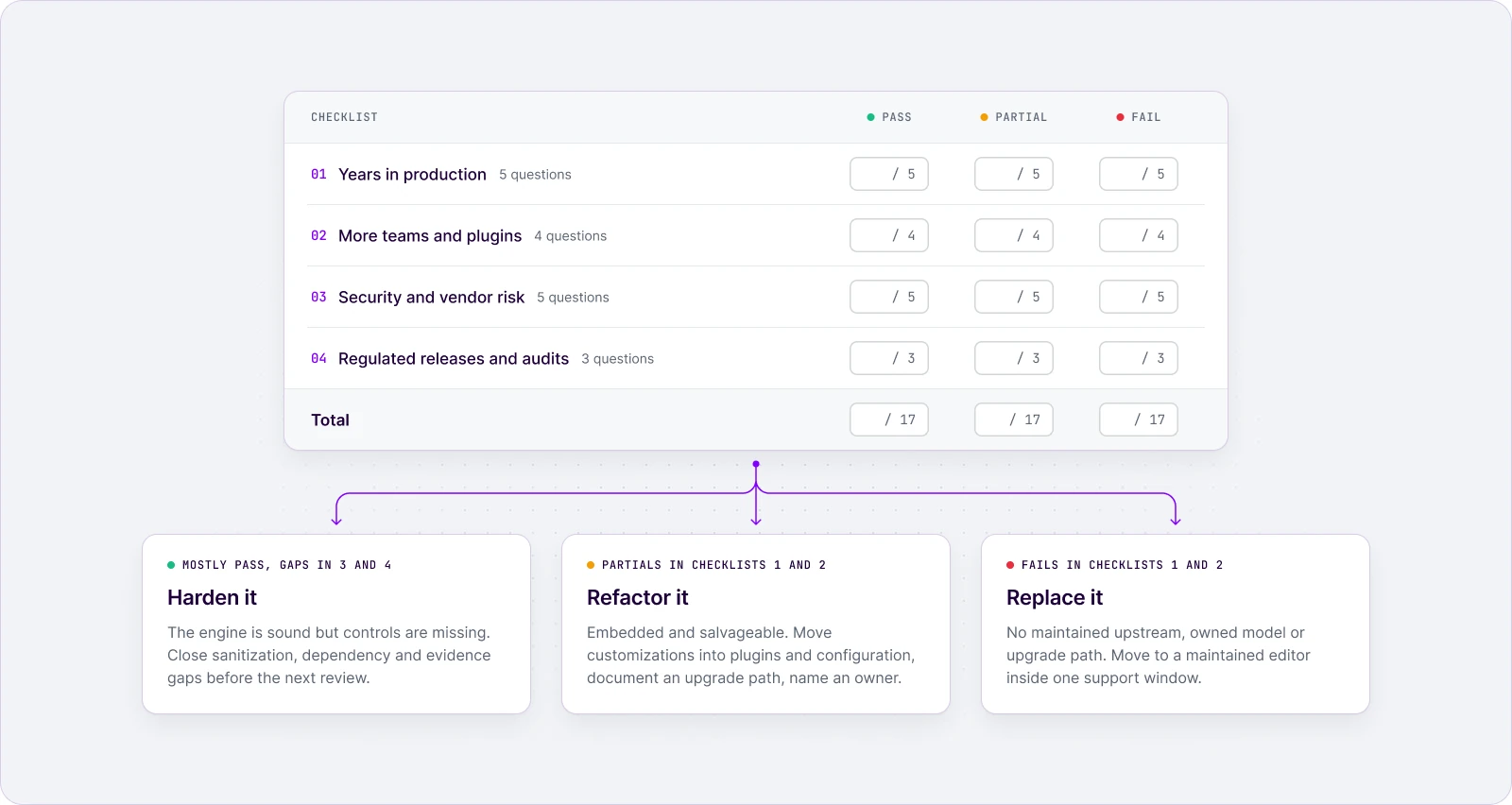
Score the results: harden, refactor, or replace
Count the fails by checklist. They show which of three paths you’re on, and they turn the build vs buy question into a narrower one: who should own this engine for the next five years?
- Harden (mostly pass, gaps in checklists 3 and 4): the engine is sound but controls are missing. Close the sanitization, dependency, and evidence gaps before the next vendor-risk review or audit, then write down the editor’s owner, budget, and upgrade calendar.
- Refactor (partials in checklists 1 and 2): the editor is embedded and salvageable. Move customizations out of the engine into plugins and configuration, document an upgrade path, and name an owner.
- Replace (fails in checklists 1 and 2): there is no maintained upstream, no owned document model, or no upgrade path. Move to an editor whose maintenance is someone else’s full-time job, and plan the migration inside one support window: inventory your custom plugins and map your content format first.
Before you choose, price what you would keep owning. Building or forking an editor means funding, every year:
- the engine and its browser compatibility,
- security response: triage, patches, and disclosure,
- upgrade migrations for your framework and dependencies,
- edge-case features such as tables, paste, and collaboration,
- an on-call support line for the people who depend on the editor,
- the evidence your auditors and vendor-risk reviewers ask for.
That list is the job description of an editor vendor, which is why a maintained rich text editor is a purpose-built answer to the questions above rather than a shortcut around them. If you move, hold every candidate to the same 17 questions, CKEditor included, and ask for the links rather than the pitch. The arguments against building in-house are older than vibe coding; we laid out five of them in build a WYSIWYG editor in-house.
Final thoughts: get the answers in writing
The demo proves an editor works. This checklist proves someone will keep it working through framework upgrades, new teams, security reviews, and audits. Send these 17 questions to whoever owns your editor today, an internal team or a vendor, and ask for written answers with links. Every answer you can’t get in writing is debt you already carry. Longevity is a property you can verify on paper before you need it.
To check these answers against your own requirements
FAQ
Can a vibe-coded editor pass this checklist?
Only in part. Some gaps in checklists 3 and 4 close with work: a dependency list, backend sanitization, a disclosure channel, and written evidence. The questions that need an upstream owner stay open, because a support window, a version line to hold, migration guides, and a stable plugin API exist only if your team becomes the vendor and writes them down.
Copy linkLink copiedHow long should an enterprise rich text editor be supported?
At least as long as your release or validation cycle, plus a migration overlap. For reference, CKEditor 5 LTS lines get up to 3 years of updates, and consecutive LTS lines overlap for a year so you can move between them on your schedule.
Copy linkLink copiedCan AI coding agents handle editor upgrades for us?
They can apply documented migrations faster, but only when the documentation exists. CKEditor publishes an official update skill for AI coding agents (npx skills add ckeditor/skills) that walks through every update guide between your version and the target one. Someone on your team still reviews the changes before they are committed.
What should we do with an editor we already forked?
Measure the diff against upstream, move your customizations into plugins or configuration, and set a date to either rebase or migrate. The longer a fork lives, the larger that diff gets, so the cheapest time to decide is now.
Copy linkLink copiedTags: