Asset versioning
Asset versioning enables CKBox to keep track of multiple revisions of an asset’s binary content under a single asset identifier. Instead of producing a new asset every time the underlying file changes, CKBox stores the previous binary content as a historical version while keeping the asset’s URL, name, metadata, tags, and category assignment intact.
This is particularly useful when an image or a document is modified frequently – integrators can reference a stable asset URL while users can review, restore, or remove older versions of the file behind that URL.
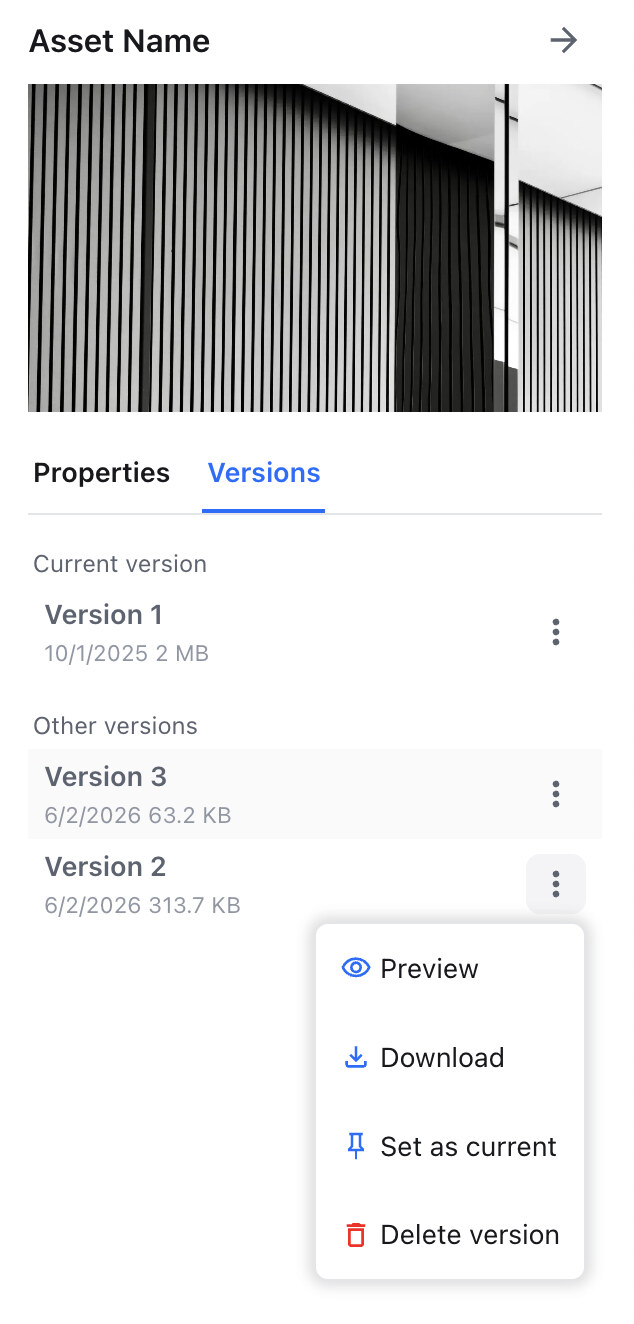
A new asset revision is created automatically in the following situations:
- Overwriting a file – using the Overwrite button to replace an asset’s content with a new file. The previously stored binary becomes a historical revision.
- Editing and overwriting an image" – when an image is opened in the image editor and saved over the original asset (instead of being saved as a new file), the previous content is preserved as a historical revision.
- Overwriting via the REST API – programmatically replacing an asset’s content through the REST API also creates a new version. The asset retains its identifier, URL, metadata, and tags, and the previous binary is kept in the revision history.
In those cases the asset retains its identifier, URL, metadata, and tags – only the underlying binary content changes, and the previous binary is kept in the revision history.
From the asset’s properties panel, users with the appropriate permissions can:
- Restore a historical revision as the current one – pick any past revision from the history and promote it to become the asset’s current content. The promoted revision replaces the active binary while preserving the asset identity.
- Remove a historical revision – permanently delete a selected revision from the history. This action removes only the chosen revision; the asset itself and other revisions remain unaffected.
Removing a revision is irreversible. Once a historical revision is deleted, its binary content cannot be restored.
Access to revision management is controlled by dedicated permissions described in the Permissions guide:
- Modifying an Asset Revision – allows setting a historical revision as the current one.
- Deleting an Asset Revision – allows removing a historical revision from the asset’s history.