AI Review
The AI Review feature provides users with AI-powered quality assurance for their content by running checks for grammar, style, tone, and more. It also introduces an intuitive interface for reviewing and managing AI-suggested edits directly within the document, ensuring content meets professional standards with minimal manual effort.
To start using the AI Review feature, first load the AIReviewMode plugin in your editor configuration. The AI Review button  will appear in the AI user interface. Learn more about installing and enabling AI features.
AI Review runs across all roots of a multi-root editor and across all editors sharing a Context. See the AI in multi-root and multi-editor setups guide for the integration details.
After picking one of the available commands in the AI Review tab, AI will analyze the document and propose a series of suggestions:
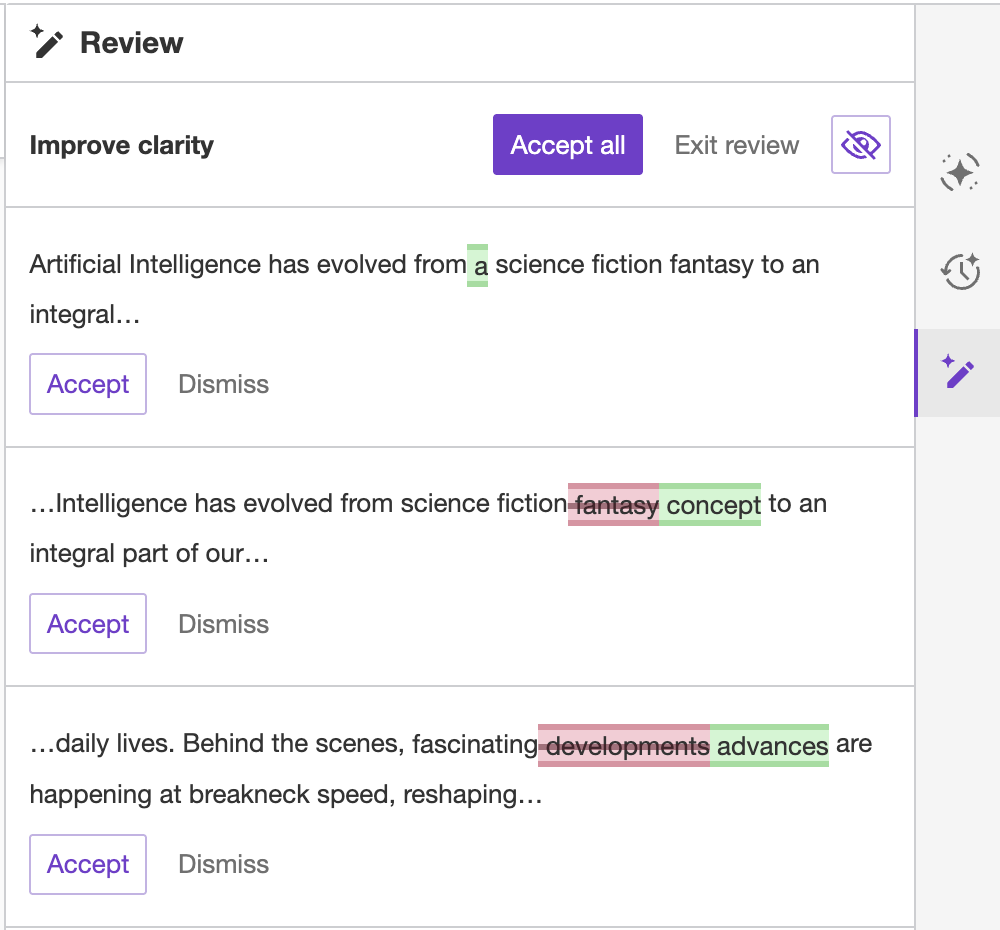
While in the AI Review, the editor remains read–only and allows you to browse suggestions. You can either click suggestions in the sidebar or select them in the editor content (underlined):
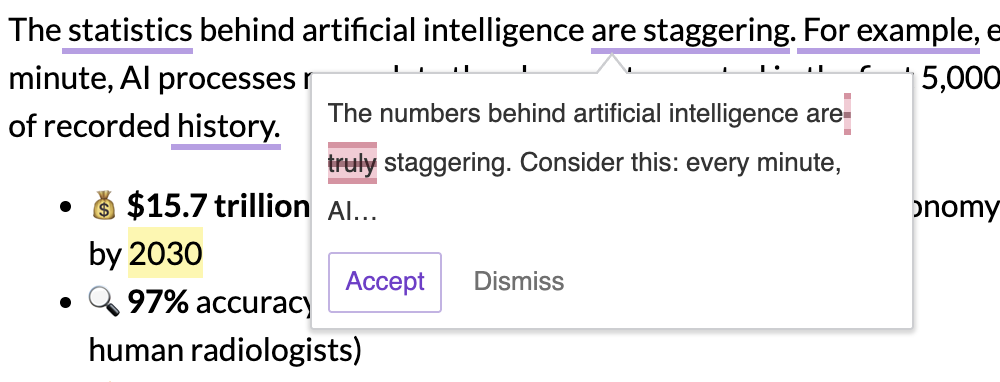
You can accept or dismiss review suggestions individually by clicking the corresponding buttons, or use the “Complete” menu in the top of the user interface to accept all suggestions, reject all suggestions, or exit the review at once, and preview changes similar to chat suggestions. Changes that were accepted or dismissed become greyed out in the interface.
Once you are done reviewing your document and all changes are accepted or rejected, click “Finish review” (the button state changes automatically) to return to the normal operation of the editor, where typing is possible.
If the review is still running or has suggestions that have not been accepted or dismissed yet, leaving it – either by choosing “Exit review” from the “Complete” menu or by switching to another AI tab, such as Chat or Translate – shows a confirmation dialog first, as the review cannot be resumed once abandoned. Choose “Stay in Review Mode” to keep reviewing, or “Exit Review Mode” to discard the review and leave.
The panel with the navigation and the actions appears under the selected change in the content. By default, it spans the document up to 750px. In a wider document, it lines up with the selected change instead. Declare the following CSS custom property to set a different maximum width:
:root {
	--ck-ai-review-navigation-panel-max-width: 600px;
}The feature comes with several review commands:
| Command name | Command description | Additional information | Configuration id |
|---|---|---|---|
| Custom command | Enter a custom command for a specific review. | You can pick one of the available AI models to execute a custom command. The default model is selected based on the model configuration. | custom |
| Proofread | Check the text for errors in grammar, spelling and punctuation. | correctness |
|
| Improve clarity | Improve the logical structure and precision for a clearer message. | clarity |
|
| Improve readability | Adjust sentence structure and word choice for an easier read. | readability |
|
| Adjust length | Shorten or lengthen the text as needed. | Longer and Shorter options available | length |
| Adjust tone and style | Modify the text to a desired tone and style. | Several tone and style options are available: Casual, Direct, Friendly, Confident, Professional | tone |
In the UI, commands are split into two groups: commands that run immediately once selected (Proofread, Improve clarity, Improve readability, and any extra command), and commands that open a configuration panel first (Custom command, Adjust length, Adjust tone and style).
The list of review commands visible in the AI Review UI can be adjusted by reordering them or removing selected ones. Please refer to the Available review commands section below.
The list of available review commands visible in the AI Review UI can be adjusted via config.ai.review.availableCommands. This configuration option accepts a list of command IDs. The order of IDs on the list defines the order of commands within each of the two UI groups described in the Review commands section above (immediate commands and commands with a configuration panel are always grouped separately). You can limit the list of commands to only desired ones and reorder them at the same time:
ClassicEditor
	.create( {
		/* ... */

		plugins: [ AIReviewMode, AIEditorIntegration, /* ... */ ],

		ai: {
			review: {
				availableCommands: [
					'length',
					'tone',
					'readability',
				]
			}
		}
	} )
	.then( /* ... */ )
.catch( /* ... */ );Please refer to the Review commands section above to see all available commands.
The AI Review feature uses the unified model configuration from config.ai.models, which is shared across all AI features (Chat and Review). This ensures consistent model selection behavior across your AI features.
When using the Custom command, the default model is automatically selected based on the defaultModelId configuration. You can also manually select a different model from the available models list, which is filtered by the displayedModels configuration.
The model selector UI visibility is controlled by the config.ai.models.showModelSelector setting.
The AI Review feature supports adding custom commands tailored to your specific needs. Each custom command requires a custom prompt definition. You can optionally specify a model ID to use a particular model instead of the default one.
The command definition needs to be provided via config.ai.review.extraCommands configuration option. This option registers the command in the AI Review feature.
ClassicEditor
	.create( {
		/* ... */

		plugins: [ AIReviewMode, AIEditorIntegration, /* ... */ ],

		ai: {
			review: {
				extraCommands: [
					{
						id: 'improve-captions',
						label: 'Improve Captions',
						description: 'Improve image captions in the document.',
						prompt: 'Suggest improvements for the image captions in the document.',
					},
					{
						id: 'expand-abbreviations',
						label: 'Expand Abbreviations',
						description: 'Expand abbreviations in the document.',
						prompt: 'Suggest expansions for abbreviations in the document.',
						model: 'gpt-5.4'
					}
				]
			}
		}
	} )
	.then( /* ... */ )
.catch( /* ... */ );If config.ai.review.availableCommands configuration option is not set, the extra commands will be added to the end of the list of available commands and visible in the UI by default. However, once config.ai.review.availableCommands is defined, it overrides the default list. In this case, you must explicitly include all commands that should be available in the UI (both default and extra ones), as only the commands listed in this configuration will be exposed:
ClassicEditor
	.create( {
		/* ... */

		plugins: [ AIReviewMode, AIEditorIntegration, /* ... */ ],

		ai: {
			review: {
				availableCommands: [
					'improve-captions',
					'expand-abbreviations',

					'custom',
					'correctness',
					'clarity',
					'readability',
					'length',
					'tone',
				],
				extraCommands: [ /* ... */ ],
			}
		}
	} )
	.then( /* ... */ )
.catch( /* ... */ );An extra command can also take its prompt from a context instead of carrying it inline. See the Context section below.
Review commands can draw on a context from the Context Library – a named container of reusable prompts, reference files, or both, kept on the AI service and referenced by its id. A context can shape every review automatically, or supply the prompt of a single extra command.
Reference the context in config.ai.defaultContext and target the review feature. Set it to true to attach the context to every review command:
ClassicEditor
	.create( {
		/* ... */

		plugins: [ AIReviewMode, AIEditorIntegration, /* ... */ ],

		ai: {
			defaultContext: [
				{
					id: 'editorial-rules',
					features: {
						review: true
					}
				}
			]
		}
	} )
	.then( /* ... */ )
.catch( /* ... */ );Provide a RegExp instead to attach the context only to selected commands. It is matched against the configuration ID of the command, that is one of the predefined IDs or the ID of an extra command:
ai: {
	defaultContext: [
		{
			id: 'editorial-rules',
			features: {
				review: /^(correctness|tone)$/
			}
		}
	]
}The attached context is invisible to the user, and the same reference is applied whether the review starts from the review panel or from startReview() and startCustomReview().
An extra command can take a context reference instead of an inline prompt, so the prompt is maintained in the Context Library rather than in the editor configuration. This suits instructions owned outside the codebase – the editorial team updates the prompt in the library, and every review picks it up without a deployment. The prompt text also stays out of the frontend: it is not stored in the editor configuration and does not show up in the network traffic of the request. Combining both sends the inline prompt and attaches the context as reference material:
ai: {
	review: {
		extraCommands: [
			// The referenced prompt drives the command.
			{
				id: 'house-style',
				label: 'House style',
				description: 'Check the document against the house style guide.',
				context: { id: 'style-guide', promptId: 'f4Yc8LmQ2xR7Kb1WpN3sZ' }
			},

			// An inline prompt with a file attached as reference material.
			{
				id: 'improve-captions',
				label: 'Improve Captions',
				description: 'Improve image captions in the document.',
				prompt: 'Suggest improvements for the image captions in the document.',
				context: { id: 'style-guide', fileId: 'Nq6ZtW3xB8kL1sYd7RpM2' }
			}
		]
	}
}A context that references only a single file cannot drive a command on its own and must be combined with an inline prompt.
The promptId and fileId values are generated by the AI service, unlike the context id. Read more about context references.
Document reviews are also available via the Reviews REST API. Use this to analyze documents for grammar, clarity, readability, and tone outside the editor, returning specific suggestions for improvement. See the programmatic documentation for examples and the full API reference.