
Set up your environment
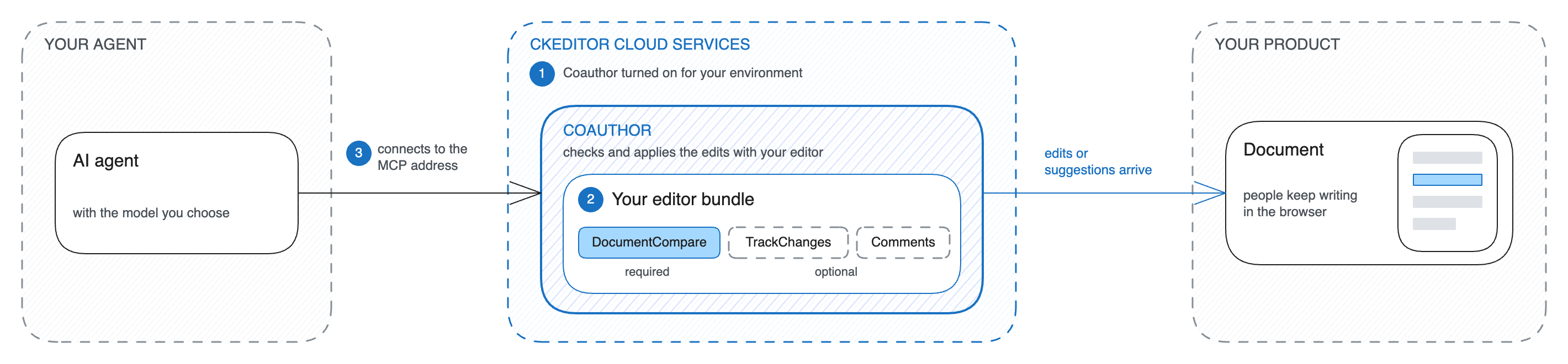
Before you can use Coauthor, contact us to turn it on for your CKEditor Cloud Services environment, or to get a license key with Coauthor for your CKEditor Collaboration Server On-Premises. Then add DocumentCompare to your editor bundle, and find the MCP address that your agent connects to.
To try it in a few minutes instead, follow the Quick start.
Cloud Services runs your editor bundle in every session. Coauthor checks and applies your agent’s edits with that editor. So your bundle needs CKEditor 5 v49.0.0 or later, with these premium features:
DocumentCompare, always. Coauthor reads the document and applies the edits with this plugin. Without it, a session cannot open. If the editors of a live document still use a bundle withoutDocumentCompare, the session fails at once with HTTP 400bundle-missing-plugin.TrackChanges, if your agent’s edits should arrive as suggestions.Comments, if your documents have comments.
Add these plugins to your existing editor configuration. If you have no bundle build yet, start from the upload script in the Quick start, and add the plugins of your editor to it. Then build the bundle and upload it under a new version, as Editor bundle describes. With Collaboration Server On-Premises, send it to POST <APPLICATION_EXTERNAL_ENDPOINT>/api/v5/<environmentId>/editors on your own server. Sign the request with an API secret of the environment, as Request signature describes. You manage API secrets in the Management Panel.
The version that a session runs depends on the type of document:
- A live document: the session runs the version that your editors use.
- An uploaded document: your backend picks the version when it opens the session.
- A snapshot: your backend picks the version too. Pick the version of the editor that took the snapshot.
Document types describes the three types.
Your agent connects to the MCP address of your environment:
https://<organizationId>.cke-cs.com/toolkit/v1/environments/<environmentId>/mcp
<organizationId>is the first part of the host name of your Cloud Services addresses. For the token URLhttps://17717-dev.cke-cs.com/token/dev/XXX, it is17717-dev.<environmentId>is the ID of your environment in the Customer Portal.
With Collaboration Server On-Premises, the address starts with the public URL of your server. It is the same as APPLICATION_EXTERNAL_ENDPOINT, if you set it:
<APPLICATION_EXTERNAL_ENDPOINT>/toolkit/v1/environments/<environmentId>/mcpFor example, https://cs.example.com/toolkit/v1/environments/<environmentId>/mcp. Find <environmentId> in the Management Panel.
In both cases, your backend opens, applies, and closes sessions at the same address, without /mcp at the end.
- Authentication shows how your backend signs the tokens of your agent.
- Connect an agent shows how your agent connects and works on a document.