How CKEditor AI works
CKEditor AI passes the model only the parts of the document a request needs and returns editor-ready HTML. This page follows one request: what CKEditor AI holds in context, how it edits a document, which model it uses, and what comes back in the response.
A general-purpose agent such as Claude Code, Cursor, or Codex gives a model context and tools, but knows nothing about your editor. Ask one for a document with footnotes, merge fields, and a nested list, and you get HTML that your editor does not accept. It also makes no guarantee about speed or token use.
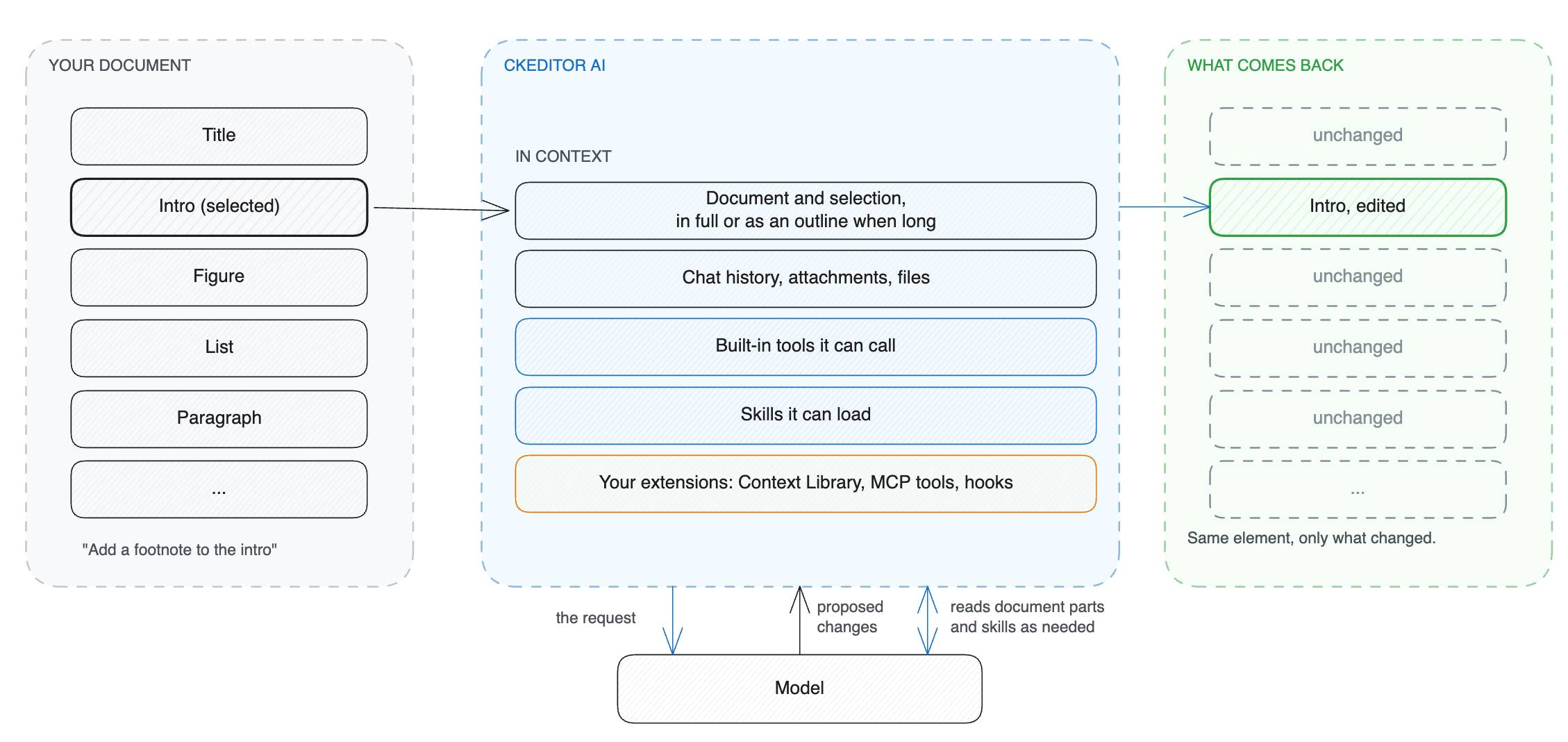
CKEditor AI supplies what a general-purpose agent lacks: tools built for rich text markup, context chosen for the task, and knowledge of CKEditor 5 features.
Besides the user’s prompt, CKEditor AI keeps the following in its context:
- Documents: their content and the current selection.
- Chat history: earlier messages, with their attachments and files.
- Built-in tools: for editing the document, reading its content, searching the web, and other tasks.
- Skills: instructions for using each editor feature.
- Additional context: whatever you add through the Context Library, MCP tools, or hooks.
If CKEditor AI passed all of that to the model on every request, each request would cost more tokens and more time, and a long document would overrun the model’s input limit. Instead, it holds everything and sends the model only what the current request needs.
When a prompt arrives, CKEditor AI first determines whether the user wants a chat answer, a document change, or both, and builds the context for that request. During the request, the model reads the document parts and the skills it needs.
CKEditor AI targets individual elements, so an edit changes what it needs to and leaves the rest of the document as you sent it.
A document does not have to fit in one model call. CKEditor AI reads only the parts a request needs, with built-in tools that read a range or search for text. That works for a local edit, such as a selected heading, and for one instruction across the whole document, such as a translation into another language.
CKEditor AI knows the markup behind the CKEditor 5 features it supports, matched to the editor version you run, and we keep it current with every editor release. It is why an image lands in a figure element, a merge field serializes the way your editor reads it, and a multi-level list nests correctly.
Skills are where that knowledge lives. They ship with the service, so there is nothing for you to update. See Skills for how they work.
Each request names a model. The Models page lists the options, including our own Agent. We evaluate models on common editor tasks and pick the one Agent runs on. When a better one arrives, Agent moves to it, and your requests stay as they are. If that model is unavailable, the next one on its list takes over.
To run CKEditor AI on your own models, see Model providers.
The response is a fragment: only the parts of the document that changed, each anchored to the element it belongs to. The CKEditor AI plugin applies them for you, and the changes appear in CKEditor 5 as track-changes suggestions your users accept or reject. Without the plugin, you apply them to your copy of the document yourself.
See Fragment responses for the format, and Streaming protocol for the events a streaming endpoint sends.
- Quick start takes you through your first request against a real document in a few minutes.
- Choose an extension shows how to add your own knowledge, tools, models, and rules without changing your integration.