Hooks
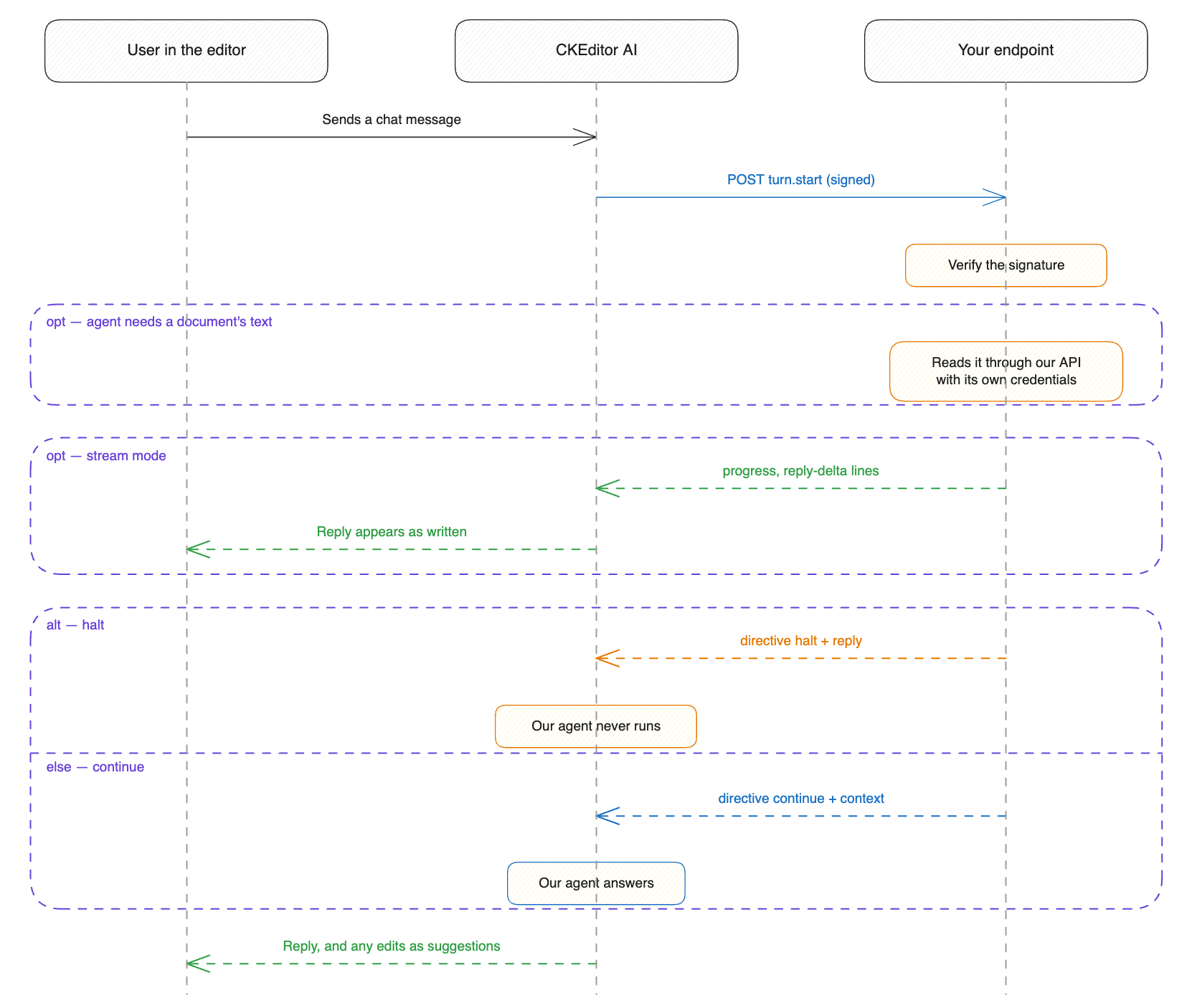
A chat turn is one user message and its reply. Hooks call an endpoint you host at fixed points of a turn. Your endpoint reads the turn, then answers the user itself or hands the turn to our agent with context and instructions of your own.
To build that endpoint, you set the hooks option, verify the signature on each request, and return a halt or a continue decision. One event exists today, turn.start. It fires after the user sends a chat message and before our agent runs.
For what a hook is for and when to use one, see Hooks in the CKEditor AI guides.
CKEditor AI On-Premises ships no endpoint for hooks to call. Hooks connect a service you build and operate.
Hooks run only for the events listed in hooks.enabled. Without the hooks option, none run. To turn hooks off without losing the configuration, set enabled to an empty array.
Hooks fail closed. If your endpoint errors, redirects, times out, or answers outside the contract, the chat turn fails. We do not fall back to our own agent. While your endpoint is down, no chat turn completes.
- An HTTPS endpoint you host: it accepts a
POSTwith a JSON body and answers with a decision. - An answer within the timeout: every chat turn waits for your endpoint, so measure your service’s response time first.
- A shared secret: we sign every request with it, and your endpoint uses it to reject calls that did not come from us.
One endpoint serves the whole deployment. Every environment calls the same URL with the same secret.
All hook settings live under the hooks option. This example sends every chat turn to your endpoint and waits up to 30 seconds:
{
	"hooks": {
		"endpoint": "https://agent.example.com/ckeditor-ai",
		"enabled": ["turn.start"],
		"auth": {
			"type": "shared-secret",
			"secret": "whsec_c2VjcmV0LWJ5dGVzLWdvLWhlcmUtcGFkZGVk"
		}
	}
}Or pass it as the HOOKS environment variable, containing a stringified JSON:
docker run --init -p 8000:8000 \
	# ... other environment variables ...
	-e HOOKS='{"endpoint":"https://agent.example.com/ckeditor-ai","enabled":["turn.start"],"auth":{"type":"shared-secret","secret":"whsec_c2VjcmV0LWJ5dGVzLWdvLWhlcmUtcGFkZGVk"}}' \
docker.cke-cs.com/ai-service:[version]| Option | Required | Default | Description |
|---|---|---|---|
endpoint |
yes | – | The URL we call. Must use https, unless you also set allowPlaintextHttp. |
enabled |
yes | – | Which hook events call your endpoint, as an array. An empty array configures the endpoint but calls nothing. |
auth |
yes | – | The shared secret we sign requests with. See Authentication. |
responseMode |
no | json |
One JSON object or an NDJSON stream. See Response modes. |
timeoutMs |
no | 30000 |
How long the whole exchange may take. Minimum 1000, maximum 600000. Applies in both response modes. |
streamIdleTimeoutMs |
no | 30000 |
The longest silence we tolerate in stream mode. Minimum 1000, maximum 60000. Ignored in json mode. |
envelopeByteBudget |
no | 10000000 |
How many bytes of attached files one request may carry. Minimum 0, maximum 20000000. See Attachment budget. |
outcomeMaxEntries |
no | 50 |
How many entries forward.instructions and forward.context may each carry. Minimum 1, maximum 500. |
outcomeMaxCharacters |
no | 20000 |
How many characters reply, forward.instructions, and forward.context may each carry in total, and each streamed channel in stream mode. Minimum 1000, maximum 100000. |
allowPlaintextHttp |
no | false |
Allows an http:// endpoint. See Endpoint requirements. |
The service refuses to start if the configuration breaks any of these rules.
HTTPS is required. The service refuses to start with an http:// endpoint unless you also set allowPlaintextHttp:
"endpoint": "http://agent.internal:8080/ckeditor-ai",
"allowPlaintextHttp": trueOnly set allowPlaintextHttp when the traffic never leaves a network you control. The request body carries the user’s prompt and the contents of their attachments unredacted, and plain HTTP sends them unencrypted.
Redirects are not followed. A 3xx answer fails the turn. Configure the final URL.
A private address is allowed. The endpoint can be a host that the internet cannot reach. The service does not filter endpoint addresses.
Your endpoint must reject any request that did not come from CKEditor AI. The required auth option is how we prove a call is ours.
The signature is the only credential in the request. If your endpoint is behind a gateway that requires its own API key, put the hook route on a path that does not require that key.
We sign every request with an HMAC keyed by your shared secret. The example endpoint includes a complete verification you can copy.
Every request carries these headers:
| Header | Value |
|---|---|
webhook-id |
The request’s requestId, which is also in the body. |
webhook-timestamp |
Unix time in seconds, as a decimal string. |
webhook-signature |
v1, followed by the base64 signature. |
The signature is HMAC-SHA256 over {webhook-id}.{webhook-timestamp}.{body}. The body is the raw request body exactly as sent. Nothing from the URL or the method is signed, so a proxy that rewrites the path does not break verification.
Reject a request if its webhook-timestamp is more than five minutes from your own clock. Reject a webhook-id that you have already handled. These two checks stop replay attacks.
auth.secret is the shared secret. We sign with the exact value you write here, and there is nothing to register anywhere else.
The secret is standard, padded base64 behind a whsec_ prefix. It must decode to at least 24 bytes. Generate one with:
echo "whsec_$( openssl rand -base64 32 )"Give the same value to your endpoint. There is no key rotation, so change the secret in the configuration and in your endpoint at the same time.
The secret sits in your configuration as plain text, like your LLM provider API keys. Protect the configuration the same way.
If the secret is missing or malformed, no request is sent, and the turn fails. The log reason is signing-failed, so you can tell a configuration mistake from an outage.
Each event fires at a specific moment of a chat turn.
| Event | When it fires | Decisions |
|---|---|---|
turn.start |
After the user sends a message. Before our agent runs. | halt, continue |
Fires on every chat message. Your endpoint decides whether our agent runs at all.
We call you before our own checks run. Content moderation and prompt-injection detection guard our agent, not yours. The prompt and the attachments in this request are whatever the user sent. Screen them yourself.
Your endpoint receives a POST with this JSON body. This example shows a turn with an open document, an attached file, and data from your front end:
{
  "contractVersion": "1",
  "event": "turn.start",
  "requestId": "3f2a9c1e-4b7a-4e2a-9c31-7a2e6c1d9f00",
  "environmentId": "env-123",
  "conversationId": "conv-456",
  "userId": "user-789",
  "turn": {
	"prompt": "Rewrite the introduction to be more concise.",
	"content": [
	  { "type": "document", "id": "doc-1" },
	  {
		"type": "file",
		"id": "file-1",
		"name": "brief.pdf",
		"mediaType": "application/pdf",
		"size": 48213,
		"contentBase64": "JVBERi0xLjQK..."
	  },
	  { "type": "delegation-context", "id": "ctx-1", "data": { "engagementId": "4711" } }
	],
	"attributes": { "locale": "en-US" }
  }
}Where:
contractVersion(always) – the envelope version. Allowed values:"1". See Staying compatible.event(always) – the event that fired.requestId(always) – identifies this call. Also travels as thewebhook-idheader. Comes back in every error we report.environmentId(always) – the environment the turn belongs to.conversationId(always) – the conversation. Stable across all its turns.userId(always) – the signed-in user, as your token endpoint identified them.turn.prompt(always) – what the user typed.turn.content(always) – everything the turn works with, as an array of tagged parts. See Content parts.turn.attributes(optional) – attributes the client attached to the message. Absent when it attached none. They reach your endpoint and never the prompt.
turn.content is a list of tagged parts of these kinds:
type |
What it is | Fields |
|---|---|---|
document |
A document open in the editor | id, optional selection, optional editorConfig. A reference: read the text through our API. |
file |
A file the user attached | id, name, mediaType, size, then content for text, contentBase64 for binary, or omittedReason. |
web-resource |
A page the user pointed at | id, url, mediaType, size, then content, contentBase64, or omittedReason. |
delegation-context |
Data your own front end attached to the message | id, data. The data object is yours. It reaches your endpoint untouched. Our agent never sees it. |
The request carries no credential for our API. A service that needs a document’s text, or the earlier messages, reads them through our REST API with credentials of its own. Key the lookup on the conversationId we send.
A delegation-context part stops at your endpoint. To put your own data in front of our agent, send it as forward.context on a continue decision.
turn.content lists every document the turn works on. That includes documents the message did not mention, because the conversation already had them open. With a multi-root editor, the list can run to a hundred entries.
envelopeByteBudget caps how many bytes of attachment content one request may carry. Attachments are added in order until the budget runs out.
size is always present. An attachment that does not fit still appears, with its size and "omittedReason": "too-large", but no body. Your service can tell “the user attached nothing” from “we could not fit it”.
The prompt, the document references, and the attributes do not count against this budget. A request body above 32 MB is never sent, and the turn fails. That limit is not configurable.
Set envelopeByteBudget to 0 to send no attachment content at all. Each attachment still appears with its size and "omittedReason": "too-large", so your endpoint knows what the user attached.
Answer 200 with a decision in the body. Do not use the HTTP status to carry the outcome. A refusal is a 200 with a halt decision.
There are two decisions:
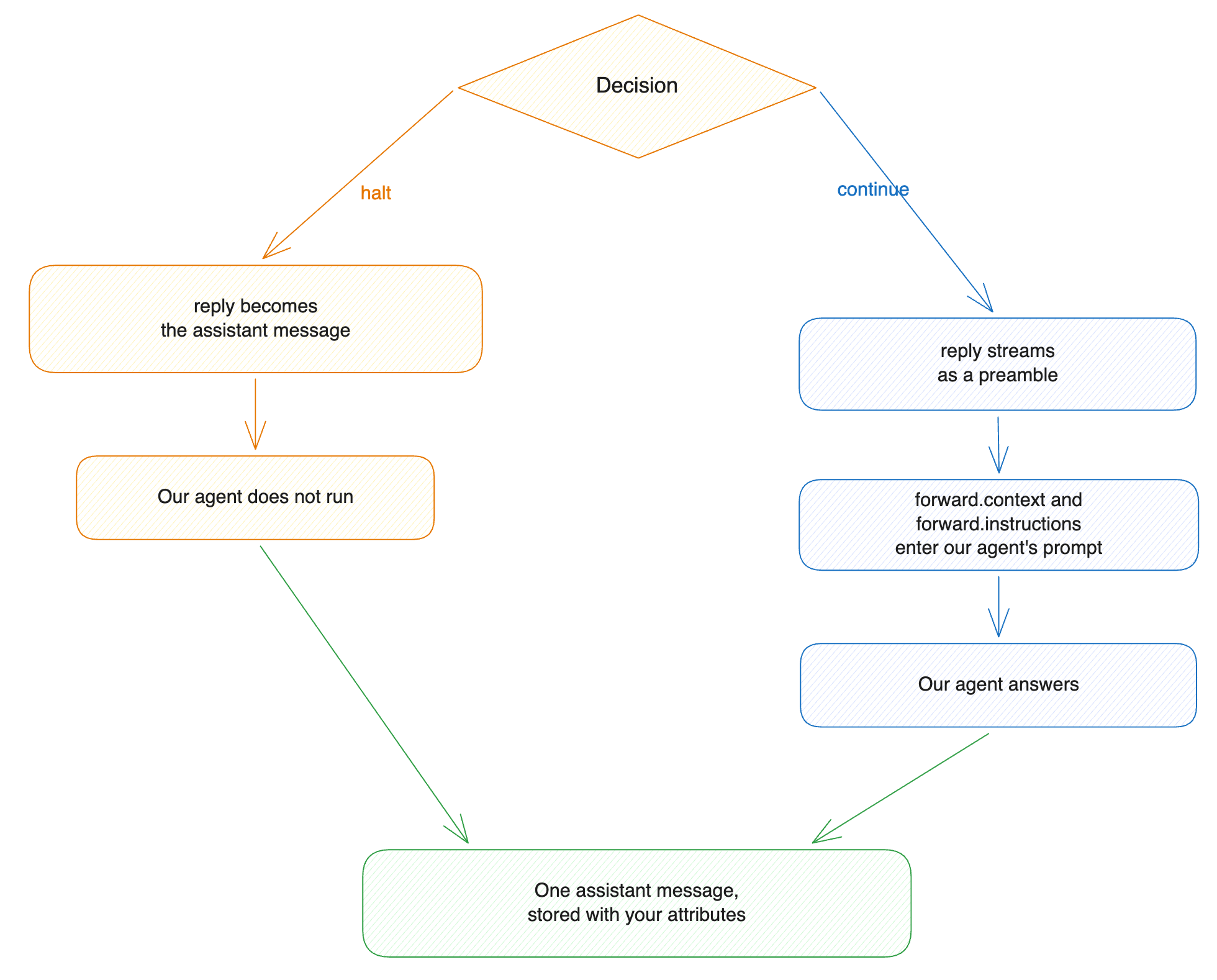
halt– your service answers the user. Our agent does not run.continue– our agent answers. You can addforward.instructionsandforward.contextfor this turn, state the outcome inforward.intentinstead of leaving it to our classifier, and stream areplyto the user ahead of our agent’s answer.
{
  "directive": "halt",
  "reply": ["Engagement 4711 is a fixed-fee statutory audit. Tax advisory is out of scope."],
  "attributes": { "engagementId": "4711" }
}Your text becomes the assistant’s message. Our agent never runs. The reply is stored like any other message, and the next turn sees it in the history.
Use halt whenever the answer is yours to give, including refusals.
{
  "directive": "continue",
  "reply": ["Checked the engagement policies. Drafting now."],
  "forward": {
	"context": ["Engagement 4711 is a fixed-fee statutory audit; scope excludes tax advisory."],
	"instructions": ["Use British English.", "Never name the client directly."]
  },
  "attributes": { "engagementId": "4711" }
}Our agent runs the turn, shaped by what you sent:
forward.contextis background. We frame it as information, not as user input or an instruction.forward.instructionsapply to this turn only. Where they conflict with the custom instructions in the system prompt,forward.instructionsapply. They cannot override the scope boundaries and the safety rules of the system prompt.replyis a preamble that streams to the user before our agent produces a word. It is stored as the opening of the assistant’s message.
We put forward.context and forward.instructions in the prompt before the user’s question.
Neither forward field is stored or carried to the next turn. A later turn that needs the same context has to send it again.
continue hands the turn to our agent, and the turn ends in a chat answer, in document edits, or in both. A classifier decides which, from the user’s question, the documents the turn works on, the recent messages, and your forward:
- We weigh
forward.contextas evidence about what the turn is for, never as a request to change the document. forward.instructionsbind our agent for this turn, so they outrank the user’s question. An instruction to rewrite a section settles the turn as an edit, and an instruction that leaves no room to change the document settles it as a chat answer.
The classifier runs on a small model with a two-second budget. A turn that works on no document produces a chat answer, and no model is called.
A classifier call that times out or fails leaves the turn unclassified: our agent keeps every document-editing tool and carries no language instruction. State forward.intent when the outcome matters to you.
When your service already knows how the turn ends, state it in forward.intent and we skip the classifier:
{
  "directive": "continue",
  "forward": {
	"context": ["Engagement 4711 is a fixed-fee statutory audit."],
	"intent": { "expectedOutput": "chat", "responseLanguage": "en" }
  }
}expectedOutput names what the turn produces:
| Value | What our agent does |
|---|---|
chat |
Answers in chat. The document-editing tools are withheld for the turn. |
document-modification |
Edits the document, with brief explanations of the edits at most. |
selection-modification |
Edits only the part of the document the user selected. |
both |
Edits the document and answers in chat. |
The other three fields shape how our agent produces that output:
responseLanguage– ISO 639-1 code for the chat answer.documentModificationLanguage– ISO 639-1 code for document edits. Name a different language to translate.requiresReasoning–falseturns reasoning off for the turn, unless the user turned it on in the editor.
A stated intent replaces the whole classification rather than adjusting it, and nothing fills in the fields you leave out. An intent that names expectedOutput and omits both languages leaves the turn with no language instruction at all, so state the languages alongside the outcome.
We apply a stated intent as it arrives and validate it against nothing in the turn. selection-modification on a turn with no selection, document-modification on a turn with no document, and a language code no model knows all reach our agent as you sent them.
The expectedOutput field is required. An intent that omits it fails the turn as invalid-decision.
directive picks the decision. Any other value fails the turn.
A halt decision carries:
| Field | Required | Type and bounds |
|---|---|---|
directive |
yes | "halt". |
reply |
yes | Array of strings, joined with newlines. outcomeMaxCharacters in total. In stream mode, reply-delta lines can carry the text instead. |
attributes |
no | Object with string keys. Not size-checked. Never reaches the prompt. |
A continue decision carries:
| Field | Required | Type and bounds |
|---|---|---|
directive |
yes | "continue". |
reply |
no | Array of strings, joined with newlines. outcomeMaxCharacters in total. Streamed as a preamble ahead of our agent’s output. |
forward.instructions |
no | Array of strings. outcomeMaxEntries entries, outcomeMaxCharacters in total. |
forward.context |
no | Array of strings. outcomeMaxEntries entries, outcomeMaxCharacters in total. |
forward.intent |
no | Object. Replaces our intent classification for this turn. Not size-checked. |
attributes |
no | Object with string keys. Not size-checked. Never reaches the prompt. |
A forward.intent object carries:
| Field | Required | Type and bounds |
|---|---|---|
expectedOutput |
yes | "chat", "document-modification", "selection-modification", or "both". |
responseLanguage |
no | ISO 639-1 code for the chat answer. |
documentModificationLanguage |
no | ISO 639-1 code for document edits. |
requiresReasoning |
no | Boolean. false turns reasoning off for the turn, unless the user turned it on in the editor. |
A halt whose text is blank fails the turn.
We merge attributes into the metadata of the stored message. If a key is also in the attributes the client sent, the value from your decision replaces it. Your front end can read the metadata back.
Each cap counts per array, and a decision over one fails the turn as cap-exceeded. Raise them with outcomeMaxEntries and outcomeMaxCharacters, up to 500 entries and 100,000 characters. Keep instructions short whatever the cap: they enter the prompt on every turn.
Only your reply enters the conversation history. The request and decision envelopes are logged and traced but never stored as messages.
responseMode picks one of two response shapes. Both carry the same decision.
json, the default |
stream |
|
|---|---|---|
| What the user sees while your service works | Nothing. The chat waits. | Progress lines, then the reply appearing as you write it. |
| What you build | A handler that returns one JSON body. | A handler that writes NDJSON lines and holds the connection open until it decides. |
| What the timeouts bound | timeoutMs: the whole answer. |
timeoutMs: the whole exchange. streamIdleTimeoutMs: the silence between lines. |
| If the exchange fails partway | The turn fails. The user sees only an error. | The progress lines and the reply text already sent stay in the chat. The error message follows them. |
A halt decision |
Must carry the reply. |
Can carry it, or stream the text as deltas and decide with no reply at all. |
If your service answers in a second or two, answer once. Stream when it takes longer, or when you want the user to see progress.
Reply 200 with the decision as the whole body and content-type: application/json. The examples above are complete answers.
Reply 200 with content-type: application/x-ndjson. Write NDJSON: one JSON object per line, flushed as you go. Any other content type fails the turn before we read a line. We send accept: application/x-ndjson so your handler can tell the modes apart.
{"type":"progress","text":"Checking 14 engagement policies…"}
{"type":"progress","text":"Consulting the governance agent…"}
{"type":"reply-delta","text":"The engagement is "}
{"type":"reply-delta","text":"a fixed-fee statutory audit."}
{"directive":"halt"}
| Line | What the user sees |
|---|---|
{"type":"progress","text":"…"} |
A status line in the chat, separate from the reply. |
{"type":"reply-delta","text":"…"} |
The assistant’s reply, appearing as it is written. |
A line with a directive |
The decision. It ends the stream. |
The decision line is the same object you would send as a JSON body. A stream that ends without one fails the turn, even after a complete reply.
Each channel has its own cap of 20,000 characters across the whole stream: the progress lines share one, the reply-delta lines another, and the steering lines a third. outcomeMaxCharacters raises all three. A stream that goes over a cap fails the turn as cap-exceeded.
A line we do not recognize is ignored, so a handler written against a newer contract still works. Send only the line kinds above: an unrecognized line is charged to the steering channel at its full length, and enough of them fail the turn.
A steering line carries forward and attributes, and it can arrive at any point in the stream. Any of these patterns works:
Send only user-facing lines, then decide. The whole forward goes on the decision line at the end. Use this when your service only knows what to forward once it has finished.
Build the forward in pieces. Send each piece as soon as you have it. Every steering line adds to the lines before it. Do not send the same entry twice.
Mix the two. steering and progress lines are independent. The same stream can tell the user “checking the engagement file” while it loads that file into forward.context. Steering never reaches the user.
A stream that uses all of it:
{"type":"progress","text":"Looking up engagement 4711…"}
{"type":"steering","forward":{"context":["Engagement 4711 is a fixed-fee statutory audit."]}}
{"type":"progress","text":"Checking the scope exclusions…"}
{"type":"steering","forward":{"context":["Scope excludes tax advisory."],"instructions":["Never name the client directly."]}}
{"type":"steering","forward":{"instructions":["Use British English."]},"attributes":{"styleGuide":"uk-2026"}}
{"directive":"continue","reply":["Checked the engagement policies. Drafting now."],"forward":{"instructions":["Keep the introduction under 120 words."],"intent":{"expectedOutput":"both","responseLanguage":"en","documentModificationLanguage":"en"}}}
The merge rules:
contextandinstructionsconcatenate in arrival order, with the decision line last.intentreplaces rather than accumulates. The last one stated wins whole, the decision line included, and the fields an earlierintentset do not survive into it.attributesmerge key by key. A later line wins a shared key, the decision line included.- The caps apply to each line and again after the merge. If one line is over the cap, we drop that field from the line. If the merged
forwardis over the cap, the turn fails.intentis not size-checked, and it is dropped along with the rest of aforwardthat is. - A
haltdecision discards theforwardfrom everysteeringline. Theattributesfrom those lines still reach the stored message.
A malformed fragment is dropped, and the turn goes on. Each field is checked on its own.
A complete endpoint, in Node with Express:
import express from 'express';
import { Buffer } from 'node:buffer';
import { createHmac, timingSafeEqual } from 'node:crypto';

const SECRET = process.env.CKEDITOR_AI_HOOK_SECRET; // whsec_...
const TOLERANCE_SECONDS = 300;

const app = express();

// Note the text parser: verification needs the body exactly as it arrived.
app.post( '/ckeditor-ai', express.text( { type: 'application/json', limit: '32mb' } ), ( req, res ) => {
	if ( !verify( req.headers, req.body ) ) {
		res.sendStatus( 401 );
		return;
	}

	const { turn } = JSON.parse( req.body );

	if ( isOutOfScope( turn.prompt ) ) {
		res.json( { directive: 'halt', reply: [ 'I cannot advise on that. Ask the compliance desk.' ] } );
		return;
	}

	res.json( {
		directive: 'continue',
		forward: { context: [ lookUpCaseFile( turn ) ] },
		attributes: { reviewedBy: 'policy-agent' },
	} );
} );

function verify( headers, rawBody ) {
	const id = headers[ 'webhook-id' ];
	const timestamp = headers[ 'webhook-timestamp' ];
	const header = headers[ 'webhook-signature' ];

	if ( !id || !timestamp || !header ) {
		return false;
	}

	if ( Math.abs( Date.now() / 1000 - Number( timestamp ) ) > TOLERANCE_SECONDS ) {
		return false;
	}

	const key = Buffer.from( SECRET.slice( 'whsec_'.length ), 'base64' );
	const expected = createHmac( 'sha256', key )
		.update( `${ id }.${ timestamp }.` )
		.update( rawBody, 'utf8' )
		.digest( 'base64' );

	return header.split( ' ' ).some( entry => equals( entry.split( ',' )[ 1 ] ?? '', expected ) );
}

function equals( a, b ) {
	return a.length === b.length && timingSafeEqual( Buffer.from( a ), Buffer.from( b ) );
}Verify against the raw request body. express.json() hands you a parsed object, and JSON.stringify on it produces different bytes, so the signature will never match. Use your framework’s raw-body option.
For production, also remember the webhook-id values you have accepted and refuse a repeat. Log requestId on every call: it ties your logs to ours for the same turn.
The user’s request ends with an error. No assistant message is stored.
| What happened | HTTP status | Error code |
|---|---|---|
Your endpoint did not answer within timeoutMs, or a stream stalled |
504 |
hook-timeout |
| Anything else: an error status, a redirect, an unreachable host, a body we cannot parse, a decision outside the contract, an unusable secret | 502 |
hook-failed |
Both errors carry a requestId. It is the same value from the request body and the webhook-id header, so you can match a failed turn to your own logs.
In stream mode, the user may have seen progress or part of a reply before the failure. Those stay on screen. The error follows them.
The service logs every failure with the requestId, the environment, the conversation, and a reason: timeout, redirect, http-error, network-error, malformed-body, body-too-large, signing-failed, cap-exceeded, reserved-directive, invalid-decision, or unknown-directive.
contractVersion is "1". Within one version, the contract only gains fields: new envelope fields and new stream line kinds. A handler that you write today continues to work.
Two rules make that promise safe:
- Ignore envelope fields you do not recognize. More will arrive.
- We ignore decision fields we do not recognize. Extra keys in your response are dropped without failing the turn. Put your own bookkeeping in
attributes.
A change that would break a version 1 handler comes with a new contractVersion.
| Limit | Value | Configurable |
|---|---|---|
| Whole exchange, both modes | 30 s, up to 600 s | timeoutMs |
| Silence between streamed lines | 30 s, up to 60 s | streamIdleTimeoutMs |
| Attachment content per request | 10 MB, up to 20 MB | envelopeByteBudget |
| Request body | 32 MB | no |
Entries in instructions and context |
50 per array, up to 500 | outcomeMaxEntries |
Characters in reply, instructions, context |
20,000 per array, up to 100,000 | outcomeMaxCharacters |
| Streamed characters, per channel | 20,000, up to 100,000 | outcomeMaxCharacters |