Context library
The context library stores prompts and files in your environment. A request references a context by id, and CKEditor AI reads the context’s content on every call. Users do not paste the same rules and reference material into each prompt. This page covers how to create contexts, reference them, apply them automatically, and read their files from an MCP server.
A context holds two kinds of items:
- Prompts: instruction text, such as a tone-of-voice rule, an editorial standard, or a compliance requirement.
- Files: reference documents, such as a brand guidelines PDF, a product glossary, or a policy handbook.
A context belongs to the environment. You attach it to conversations, actions, reviews, and document processing requests, or set it to apply automatically.
The service resolves a context on every call. The service adds the context’s prompts to the instructions for that call and attaches its files for CKEditor AI to read. The request stores the reference only, so a conversation that references legal-policies always uses the current version of that context.
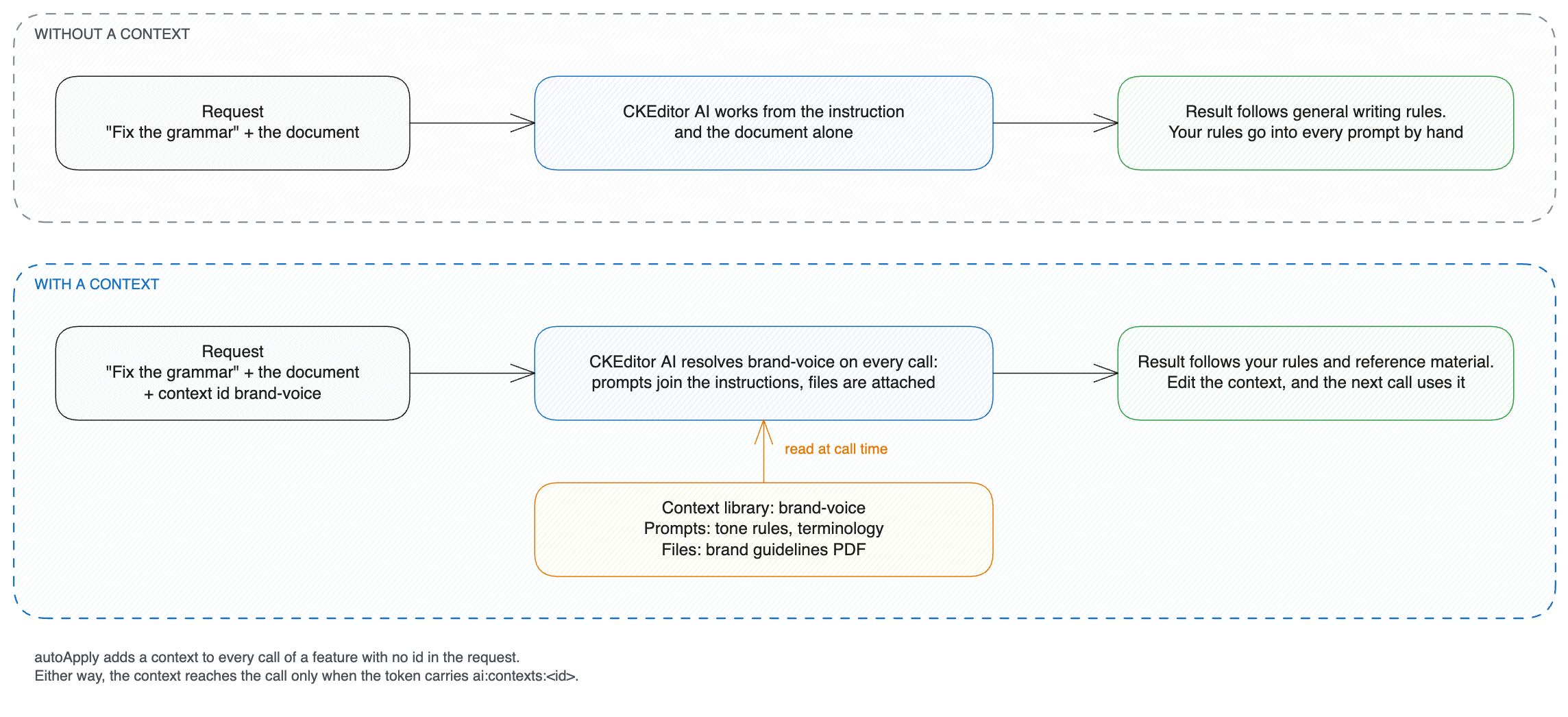
- One definition for every feature: the same
brand-voicecontext grounds a chat message and a “fix grammar” action. - Changes without a deployment: edit a prompt or replace a file, and the next call that references the context uses the new content.
- Source documents as files: attach the policy PDF itself, and CKEditor AI reads the document.
Create the container through the admin API, then add prompts and files to it.
You choose the context id. It must be unique within the environment, and your code references it, so pick a stable name.
POST /v1/admin/contexts
Content-Type: application/json
Authorization: Bearer <admin-token>

{
  "id": "brand-voice",
  "name": "Brand voice and style",
  "description": "Tone of voice, terminology, and formatting rules for all customer-facing copy.",
  "attributes": {
	"team": "marketing",
	"locale": "en-US"
  }
}Each prompt is one instruction. Keep each rule in its own prompt, so you can review one rule at a time and reference it by promptId.
POST /v1/admin/contexts/brand-voice/prompts
Content-Type: application/json
Authorization: Bearer <admin-token>

{
  "name": "Tone of voice",
  "content": "Write in a confident, plain-spoken tone. Address the reader as \"you\". Avoid superlatives, marketing jargon, and exclamation marks. Never promise outcomes we cannot measure.",
  "attributes": {
	"category": "tone",
	"priority": 1
  }
}Upload a file directly, or give a URL that the service downloads. Supported formats are PDF, DOCX, PNG, JPEG, Markdown, HTML, and plain text.
Direct upload:
POST /v1/admin/contexts/brand-voice/files
Content-Type: multipart/form-data
Authorization: Bearer <admin-token>

file: [brand-guidelines.pdf]
attributes: {"language":"en-US","category":"reference"}Upload from a URL. The URL must be reachable from the service:
POST /v1/admin/contexts/brand-voice/files
Content-Type: application/json
Authorization: Bearer <admin-token>

{
  "url": "https://docs.example.com/brand/guidelines.pdf",
  "attributes": {
	"category": "reference"
  }
}A reference names a context by id. With no other field, it resolves to every prompt and file in the context. Add promptId to resolve one prompt, or fileId to resolve one file:
{ "type": "context", "id": "brand-voice" }
{ "type": "context", "id": "brand-voice", "promptId": "V1StGXR8_Z5jdHi6B-myT" }
{ "type": "context", "id": "brand-voice", "fileId": "kR2mZ9xQ_A7bNc4V-pLdW" }A reference can carry either promptId or fileId. The caller’s token must include ai:contexts:<contextId> for each referenced context. ai:contexts:* and ai:admin cover every context.
Write an instruction once, review it once, and call it by id from then on.
In custom actions, custom reviews, and Document Processing, prompt is optional when the request references a context. One of the referenced contexts must hold a prompt. If none does, the service rejects the request.
Conversations work the same way for the message prompt. The stored message holds only the context reference, so users who read the conversation history do not see the prompt text.
Set autoApply on a context, and the service adds it to every call to the listed features. The request needs no reference. A company can apply its brand voice to every conversation this way:
PATCH /v1/admin/contexts/brand-voice
Content-Type: application/json
Authorization: Bearer <admin-token>

{
  "autoApply": {
	"features": [ "conversations" ]
  }
}features takes feature ids:
| Feature id | Applies to |
|---|---|
conversations |
Chat |
document-processing |
Document Processing |
actions.* |
Every action |
actions.custom, or a system action id such as actions.translate |
One action |
reviews.* |
Every review |
reviews.custom, or a system review id such as reviews.clarity |
One review |
* |
Every feature |
Auto-apply does not widen what a token can reach. A context reaches a call only when the caller’s token covers it with ai:contexts:<contextId>, ai:contexts:*, or ai:admin. A call from a token that does not cover the context runs without that context.
Every auto-applied prompt and file takes up part of the model’s context window on every call. Keep auto-applied items short. Put large reference documents in contexts you reference explicitly.
Use auto-apply for rules that hold across the environment, such as compliance requirements and house style. To apply a context to one group of users only, grant ai:contexts:<contextId> to that group alone.
A context can read its files from an MCP server instead of, or alongside, uploaded files. The resources the server publishes become the context’s files, and the service reads them from the server at call time. Nothing is copied into the library. A document that changes on the server is the document the next call reads.
Set mcpServerId to the server’s id when you create or update the context.
- Connect the server first: register it through the admin API, see MCP tools, or define it in an on-premises configuration, see MCP tools. Creating a context that names an unknown server fails.
- Uploaded files and MCP resources coexist: an MCP-connected context still holds its own prompts and uploaded files, so a policy PDF and a style prompt can sit next to a live catalog.
- Detaching keeps your own items: set
mcpServerIdtonullin an update to remove the server. The context’s prompts and uploaded files stay. - An unreachable server does not fail the call: the context falls back to its own prompts and uploaded files, and the request goes through without the MCP resources.
An MCP-connected context reads the server’s resources, the documents the server publishes. MCP tools are a separate feature that lets CKEditor AI look up information or act in your systems. You can use both at the same time. See MCP tools.
Two APIs cover the feature:
| API | Endpoints | Required permission | Purpose |
|---|---|---|---|
| Context Admin | /v1/admin/contexts/… |
ai:admin |
Create, update, and delete contexts, prompts, and files. |
| Context | /v1/contexts, /v1/contexts/{contextId} |
ai:contexts:<contextId> |
List and read the contexts the caller may use. |
The client API returns context and item metadata without the text of prompts. It lists only the contexts the caller’s token covers.
Managing contexts requires ai:admin. Using a context requires ai:contexts:<contextId>, granted by exact id or pattern:
{
  "auth": {
	"ai": {
	  "permissions": [
		"ai:conversations:read",
		"ai:conversations:write",
		"ai:models:agent",
		"ai:contexts:brand-voice",
		"ai:contexts:team-marketing-*"
	  ]
	}
  }
}See Context library permissions for the pattern syntax.
A support team drafts customer replies in the editor. Every reply must follow the refund policy and the brand voice. Create one context per concern and reference both in the message:
POST /v1/conversations/support-reply-8842/messages
Content-Type: application/json
Authorization: Bearer <your-token>

{
  "prompt": "Draft a reply to this customer asking for a refund 40 days after purchase.",
  "model": "agent-1",
  "content": [
	{
	  "type": "context",
	  "id": "refund-policy"
	},
	{
	  "type": "context",
	  "id": "brand-voice"
	},
	{
	  "type": "file",
	  "id": "file-XYZ12345"
	}
  ]
}The refund-policy context holds the policy PDF and a prompt on how to explain exceptions. The brand-voice context holds the tone rules. The customer’s order confirmation, uploaded by the user, goes into the same content array as a file part.
A newsroom checks house style before publishing. The editorial team owns the rules and changes them often. The review reads them from a context, so the request carries no prompt:
POST /v1/reviews/custom/calls
Content-Type: application/json
Authorization: Bearer <your-token>

{
  "content": [
	{
	  "type": "text",
	  "content": "<p data-id=\"p1\">The company said it's product is the best on the market.</p>"
	}
  ],
  "model": "agent-1",
  "contexts": [
	{
	  "type": "context",
	  "id": "editorial-standards"
	}
  ]
}Editors update editorial-standards through the admin API. No deployment is needed.
A software vendor translates release notes into several languages. Product names, UI labels, and legal terms must stay consistent, so a translation-glossary context holds the glossary as a Markdown file and a prompt with the do-not-translate list. Reference it from the translate system action:
POST /v1/actions/system/translate/calls
Content-Type: application/json
Authorization: Bearer <your-token>

{
  "content": [
	{
	  "type": "text",
	  "content": "<p>The new Track Changes sidebar groups suggestions by author.</p>"
	}
  ],
  "args": {
	"language": "German"
  },
  "contexts": [
	{
	  "type": "context",
	  "id": "translation-glossary"
	}
  ]
}System actions accept contexts the same way custom actions do. The built-in prompt stays in place, and your context adds to it.
A support team answers customer questions in the editor. The product documentation lives in the company wiki, which changes several times a week. The wiki exposes an MCP server that is already connected to the environment, so an administrator creates a context that points at it by name:
POST /v1/admin/contexts
Content-Type: application/json
Authorization: Bearer <admin-token>

{
  "id": "product-knowledge-base",
  "name": "Product knowledge base",
  "description": "Live product documentation served from the internal wiki.",
  "mcpServerId": "internal-wiki"
}Every resource the server publishes is now a file in the context. Reference the context like any other:
POST /v1/conversations/support-reply-8842/messages
Content-Type: application/json
Authorization: Bearer <your-token>

{
  "prompt": "Does our current plan allow exporting comments to PDF?",
  "model": "agent-1",
  "content": [
	{
	  "type": "context",
	  "id": "product-knowledge-base"
	}
  ]
}The application code keeps referencing product-knowledge-base when the source moves from an uploaded PDF to the wiki or to another server.
One question rarely needs a whole knowledge base. If you know which document applies, reference that document alone with fileId. An onboarding flow, for example, needs only the release notes:
POST /v1/conversations/onboarding-114/messages
Content-Type: application/json
Authorization: Bearer <your-token>

{
  "prompt": "Summarize what changed for administrators in the latest release.",
  "model": "agent-1",
  "content": [
	{
	  "type": "context",
	  "id": "product-knowledge-base",
	  "fileId": "wiki%3A%2F%2Fspaces%2Fproduct%2Fpages%2Frelease-notes"
	}
  ]
}To see the documents in an MCP-connected context, for example to build a document picker, list its files. Items from the MCP server carry "source": "mcp". Their id is the percent-encoded resource address on the server, so treat it as an opaque string:
GET /v1/admin/contexts/product-knowledge-base/files
Authorization: Bearer <admin-token>{
"items": [
{
"id": "wiki%3A%2F%2Fspaces%2Fproduct%2Fpages%2Frelease-notes",
"name": "Release notes",
"mediaType": "text/markdown",
"source": "mcp"
}
]
}- Context API reference lists the endpoints for reading the contexts a caller may use.
- Context Admin API reference covers how to create and manage contexts, prompts, and files. It includes request and response schemas and error codes.
- Check drafts against your style guide walks through a custom review driven by a context.
- Edit documents from your backend combines a context with MCP tool checks in a backend job.