Edit documents from your backend
This scenario defines the MCP server in the deployment configuration, so it runs on-premises. See On-Premises. On SaaS, register the server through the admin API instead.
This page shows one way to set this up. The extensions it uses fit this scenario, and other combinations work too. See Ways to use it and Choose an extension for the full list.
A company prepares regulatory filings that must follow its style guide: how it introduces defined terms, how it formats amounts, and how it writes cross-references. The company already runs automated checks for those rules. It wants a backend job that restyles each filing to the guide and verifies the edited filing with those checks before a reviewer opens it.
You expose those checks as tools on an MCP server, and the job sends each filing to Document Processing. The agent calls your checks while it edits the filing.
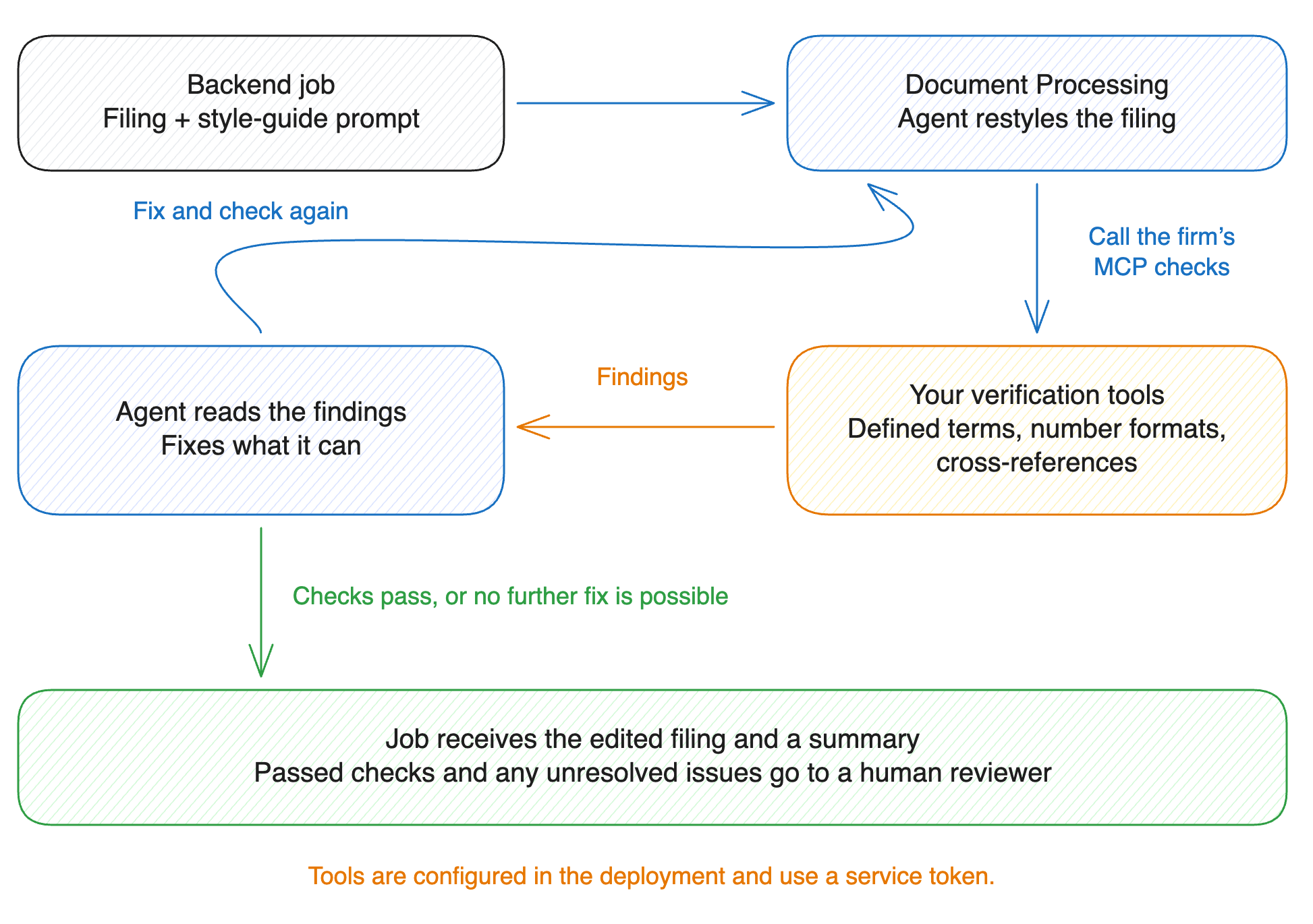
The job sends a filing to POST /v1/documents/process with the style guide as the prompt. The agent restyles the filing and calls your checks on the edited filing. Each finding names the affected element by its data-id. The agent corrects that element and runs the check again.
- Expose each of your existing checks as an MCP tool. Each finding must name the affected element by its
data-idand describe the violation. - Add the server to
mcp_serversin the deployment configuration with a service token. A backend job has no signed-in user to authorize OAuth, so the server must accept a shared credential. - Set
allowedEnvironmentsto the environments that process filings. Add any tool that must not run unattended totools.disabled. If you set neither, every environment gets the server with every tool on it, in chat as well as in Document Processing. See MCP tools. - Write the prompt. It contains the style guide and an instruction to the agent: run your checks on the edited filing, correct every violation the checks report, and name in the summary every violation it did not correct.
- Store the prompt in a context. Each request then references the context by its id. When the style guide changes, edit the context.
- Submit each queued filing from the job. Set the client timeout to 10 minutes or more, as described under Before you go to production. Save the returned filing and the summary where reviewers read them.
- One call per filing: the agent runs your checks while it edits, so the job needs no verification step of its own.
- A filing ready for review: the response carries the edited filing and a
summarythat lists every violation the checks still report. The job stores both for a reviewer.
- Processing timeout: the service allows up to 10 minutes for each call to
POST /v1/documents/process. Several rounds of checks on a long filing take minutes, so set the client timeout to 10 minutes or more. - Unresolved findings: the prompt tells the agent to run your checks, and it cannot make the filing pass them. Send every violation the summary reports as unresolved to a reviewer.
- Document restyling job with MCP verification in Node.js has the configuration, the prompt, and the backend job code.
- Document Processing covers the request, the response, and the streaming endpoint.
- MCP tools covers what the agent can do with a connected server and where its tools apply.